11 Best Floor Plan Sketching Software for Restoration Businesses
Restoration
3 min read
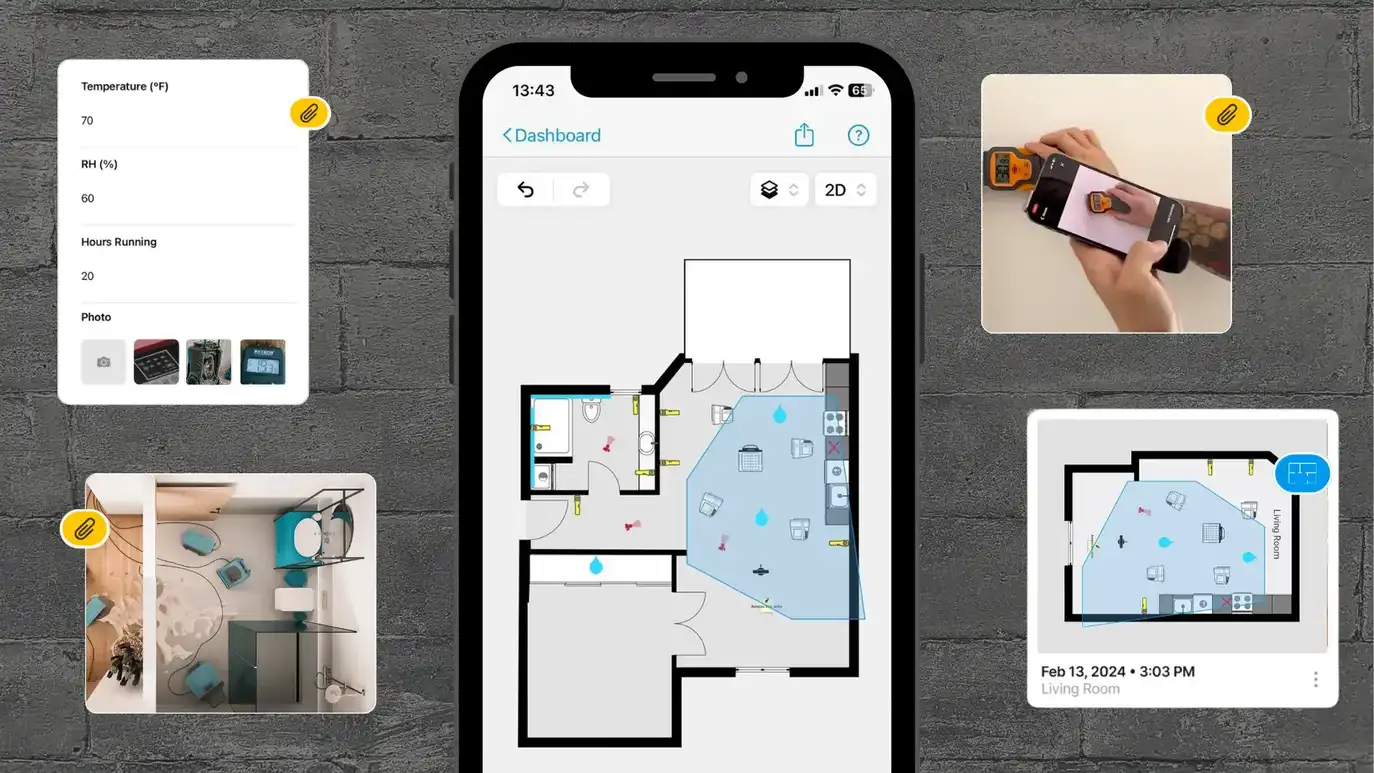
In the restoration business, making sure you have accurate floor plans is super important. These detailed sketches aren't just for looks – they're essential for documenting the damage, planning out your restoration work, and making sure your estimates are spot on so you can get paid for the job. Using the right floor plan sketching tools can save you a ton of time and hassle.
Here’s a list of the best floor plan sketching apps that can help you get the job done right.
1. magicplan
magicplan has been around for more than 12 years, becoming the most robust floor plan app for restorers due to its ease of use and powerful features.
✅ Pros:
Real-time sketches: Instantly creates floor plans using LiDAR technology on your smartphone, minimizing on-site time.
Integration: Seamless integration with Xactimate® and Symbility/CoreLogic, generating ESX and FML files instantly.
Documentation: Add photos and annotations directly to the floor plan.
Instant Sketch Adjustments: Make instant edits without contacting support.
Accuracy: High precision measurements, integrates with Bluetooth lasers.
No Extra Costs: All features are included in the subscription.
360° Tours: Creates immersive 360° tours.
Unlimited Storage: Stores unlimited files without extra costs.
Easy Learning Curve: User-friendly interface.
❌ Cons:
Learning Curve for Advanced Features: Initial learning phase can be time-consuming for some of the app's advanced features, but it leads to greater long-term efficiency.
💰Cost:
$25 per claim with everything included no extra costs, and multiple users.
2. Xactimate® Sketch
Xactimate® Sketch is a cornerstone in the restoration industry for its comprehensive estimating capabilities.
✅ Pros:
Industry Standard: Widely used and trusted in the restoration industry.
Integration: Direct integration with Xactimate® for seamless claims processing.
Documentation: Comprehensive project documentation features.
Robust Features: Extensive tools for detailed sketches.
❌ Cons:
Complexity: Steeper learning curve for new users.
💰Cost:
Part of Xactimate® subscription; contact for pricing.
3. Symbility/CoreLogic
CoreLogic's Claims Connect and ScanToSketch solutions offer high precision and integration with its suite of tools.
✅ Pros:
Integration: Integrates with CoreLogic’s suite of property valuation and surveying tools
Documentation: Detailed options for comprehensive documentation.
Comprehensive Toolset: Advanced features for detailed floor plans.
❌ Cons:
Accessibility: Requires training to use effectively.
Cost: Higher cost can be prohibitive for smaller teams.
💰 Cost:
Contact for pricing.
4. Matterport
Matterport is known for creating immersive 3D models, useful for detailed documentation.
✅ Pros:
3D Models: Create immersive 3D models.
Integration: Integrates with various restoration software, including Xactimate®.
Documentation: Good for visual walkthroughs.
❌ Cons:
Processing Time: Schematic floor plans can take up to 3 days.
Hardware Requirement: Best used with Matterport cameras.
Learning Curve: Requires time to learn.
💰 Cost:
$50/mo workspace + €40 per express floor plan.
5. DocuSketch
DocuSketch is known for generating detailed virtual tours but has long processing times for sketches.
✅ Pros:
Virtual Tours: Generate detailed 360° virtual tours offering a realistic view.
Integration: Compatible with Xactimate® and Symbility, but ESX and FML files are available 1 to 3 days after sketch processing.
Documentation: Capture comprehensive documentation, including photos and videos.
❌ Cons:
Lengthy Processing Time: Sketch processing can take 1 to 3 days.
Equipment Needs: Requires additional hardware (camera kit).
No Instant Edits: Edits require contacting support.
Additional Fees: Extra costs for floor plans over 2500 sq ft, express delivery, location changes, etc.
💰 Cost:
For 20 projects, typically around $70 per claim: $1,095/mo (Express), divided by 20 projects + $795 Camera Kit (divided by 12 months & 20 projects p/mo) + $12 for floor plan overnight delivery.
6. Encircle Floor Plan
Encircle Floor Plan offers a straightforward interface suitable for quick and easy sketching.
✅ Pros:
Ease of Use: Simple interface for quick sketching.
Integration: Integrates with Xactimate® and CoreLogic, generating ESX and FML files.
Documentation: Add notes, photos, and videos for thorough project details.
Quick Setup: Minimal training required.
Smartphone Only: No additional hardware required.
❌ Cons:
Processing Time: Minimum wait of 1.5 hours, average processing time is 6 hours.
💰 Cost:
$60.25 per project: $425/mo divided by 20 projects + $29 per floor plan + $10 per claim submitted to Xactimate®.
7. iGuide
iGuide provides detailed floor plans and 3D tours for contractors.
✅ Pros:
Detailed Output: High-quality floor plans and 3D tours.
Integration: Can be integrated with other industry software.
Documentation: Good for comprehensive documentation.
❌ Cons:
Equipment Needed: Requires specialized hardware ($1,599).
Additional Fees: Extra costs for larger properties and express delivery.
Processing Time: 24-hour processing time for properties over 5,000 sq ft.
💰Cost:
$35 per project for properties up to 1,500 sq ft. Additional costs for larger properties and hardware investment.
8. Hover
HOVER generates exterior and interior measurements, beneficial for restorers.
✅ Pros:
Detailed Reports: Generates detailed roof, exterior, and interior measurements.
Integration: Compatible with Xactimate®.
Documentation: High-quality images and 3D models.
❌ Cons:
Focus: More focused on exteriors.
💰Cost:
Pricing based on project type; contact for details.
9. Polycam
Polycam offers simple and fast 3D scanning with just a smartphone, making it highly accessible.
✅ Pros:
Ease of Use: Simple and fast 3D scanning.
Portability: Use anywhere with a smartphone.
❌ Cons:
Features: Limited compared to specialized tools.
No Integration: Lacks integration with Xactimate® or Symbility.
Accuracy: May not be as precise as dedicated equipment.
💰 Cost:
Starting at $17.99 per month.
10. Plnar
PLNAR is designed for generating detailed floor plans using just a smartphone, making it a convenient option for restorers.
✅ Pros:
• Smartphone Only: No additional hardware required, making it accessible.
• Integration: Compatible with Xactimate®, simplifying claims processing.
• Documentation: Comprehensive capture of room dimensions and annotations.
• Ease of Use: User-friendly interface, reducing training time.
• Real-time Measurements: Instantly captures and processes room dimensions.
❌ Cons:
• Feature Limitations: May lack advanced features compared to other solutions.
• Processing Time: Some users may experience delays in finalizing detailed plans.
💰 Cost:
Subscription plans vary; contact for detailed pricing information.
11. Cubicasa
Cubicasa floor plans are suitable for basic sketching needs.
✅ Pros:
Efficient Scanning: Quick scanning process, around 5 minutes per property.
Ease of Use: Simple and straightforward interface.
❌ Cons:
Processing Time: Floor plans take around 24 hours to be ready.
No Industry Integrations: Limited integration options.
Focus on Real Estate: Primarily targeted at real estate and property photography.
Conclusion
Choosing the right floor plan sketching software can make a significant difference in your restoration projects. Accurate and detailed sketches are essential for documenting damage, planning restoration work, and creating precise estimates to ensure you get paid correctly. Each of the 11 tools listed offers unique features to help streamline your workflow, from real-time sketches to integration with industry software. Evaluate each option based on your specific needs and budget to find the best fit for your restoration business.