How to Take Before, During & After Photos to Showcase Restoration Work
Restoration
4 min read
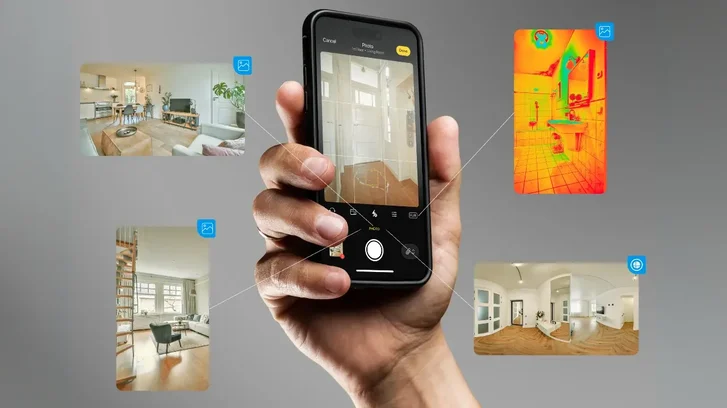
In restoration, photos are among your most valuable resources. Whether dealing with water, fire, or mold, capturing your work with appropriate photos at each stage—before, during, and after—ensures clarity for your team, clients, estimators, and adjusters. Plus, it’s a solid way to show exactly what you did and how the job progressed. Let’s break down how to take the right photos to make sure everything’s covered.
The 3 Types of Photos You Need for Every Job
When you’re documenting a restoration project, you’re taking photos for three main reasons:
1. Collection Photos – These are your “before” photos, documenting the damage before you touch anything.
2. Instruction Photos – These are the “during” shots that help you manage your team and track the progress of the job.
3. Story-Based Photos – Your “after” shots, used to show the client or insurance company the completed work.
Each type of photo plays a key role, so make sure you’re capturing what you need at every stage.
Before Photos: Capture the Damage
When you first get to the job site, your top priority is to document the damage. These before photos are your baseline—they show exactly what the property looked like before you touched anything.
If you’re using magicplan, you can snap photos while scanning the room. The Auto-Scan feature on LiDAR enabled devices pins the photos right on the sketch where you took them, so later, you’ll know exactly where everything went down. If you forget to take a photo during the scan, no big deal—you can add it afterward by dropping it right on the spot in the sketch. This way, your estimator or anyone else on the job knows exactly what’s up and where.

What to do:
Take 2-3 close-up shots of the source of the damage. If a pipe burst, get a couple of tight shots of the pipe itself and a wider one to show where it’s located in the room.
Then grab 4-7 photos of the damaged areas. Get close-ups for the details and wider shots to show the full extent of the damage.
These photos aren’t just for insurance—they’re for you. With magicplan, you’re not just shooting random pics. You’re putting them exactly where they belong, saving you a lot of guesswork later, especially when managing multiple jobs.
During Photos: Keep Your Team on Track
Once the work’s underway, instruction photos are key for managing the job. These “during” shots help you communicate with your crew, even if you’re not on-site. You can give clear directions, track progress, and avoid unnecessary trips to the job.
Need a containment barrier set up? Snap a picture, mark it up with the barrier placement, and send it to your team with notes like, “Set it up here.” Once the crew completes the task, they can take a photo from the same angle, and you’ll know the job was done right. With magicplan, the photo markup feature lets you add text, arrows, shapes, and figures directly onto the photo to show exactly what needs to be done.
Editing photos is also a breeze. If there’s sensitive info you don’t want visible—like a house number or personal details—the redact option lets you blur out parts of the photo before sharing it.
This approach saves you a ton of time, keeping you from driving across town when photos can handle the job. You stay in control, no matter where you are.

After Photos: Tell the Story of Your Work
When the job is done, it’s time to take story-based photos. These are your “after” shots, and they’re what you’ll use in reports for clients, insurance companies, or your own records.
What to do:
Snap a few key photos that show the damage has been repaired.
Don’t forget the risk shot—a wide shot of the front of the property (with the mailbox, if possible) to give insurers or clients an overall sense of the property’s condition.
Make sure to get before-and-after comparisons. If you took a shot of a wet carpet when you started, take the same shot after it’s dried and cleaned up. This shows clear progress and that the job is done.
When creating reports for clients or insurance, don’t overload them with a ton of photos. Just a few key before-and-after shots are all you need to show the work’s been completed and the problem’s resolved.
Once you have all your photos for the project in magicplan, you can jump into the photo gallery to get a clear view of the progress timeline. You can organize photos by date, rooms, and even subgroup them to create a clean, easy-to-follow story of the job. This makes it a lot simpler to see how the project unfolded from start to finish.

Generating a Photo Report
After you’ve captured all your before, during, and after photos, it’s time to create a photo report. With magicplan, you can set up reports that include clickable images and 360 panoramas. These can be shared as a PDF or a web gallery, making it easy for anyone to view the photos and walkthroughs.
This setup helps you deliver a clear, organized record of the job, giving your client or the insurance company a straightforward way to see the work you’ve done.

Wrapping It Up: Get It Done Right
Taking good before, during, and after photos is about working smart. You document the job, keep your crew on the same page, and show your clients the results.
Next time you’re on-site, take the time to grab the right photos. It’ll make your life easier when it’s time to put the report together.
GOT A MINUTE?
Share
The 3 Types of Photos You Need for Every Job
Before Photos: Capture the Damage
During Photos: Keep Your Team on Track
After Photos: Tell the Story of Your Work
Generating a Photo Report
Wrapping It Up: Get It Done Right

Bernd Wolfram
CPO





