7 Methods to Take Room Measurements at a Customer's Home
Business Tips
4 min read
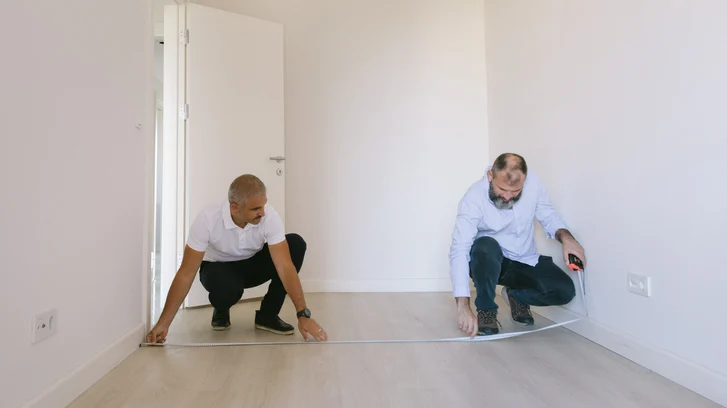
As a residential contractor, you know the importance of taking measurements during an initial consultation. Your profitability depends on the accuracy of those measurements, so that you can develop an appropriate quote, complete the project successfully, and make sure all material costs are controlled.
Framing, drywall, paint, wall tile, flooring, cabinets, drawers, shelves, vanities: Whatever you are installing, you want to make sure you purchase exactly what is needed – no more, no less. This prevents you from overspending on materials and supplies. It helps you avoid problems that cause costly delays. And it minimizes the risk of having to do rework.
Fortunately, you can have multiple measuring devices at your disposal. We summarize seven options below. Some are basic, some are high-tech. Yet, each one is practical for certain purposes. That’s why having more than one method in your tool stash is always a smart move.
So, let’s dive in…
1. Folding Ruler
Also known as a carpenter’s ruler, this basic but long-time-favorite tool folds up (collapses in size) for easy placement in a pocket or toolbelt. Then it can be pulled out and extended when measurements are needed, and will not bend like a metal measuring tape. This type of ruler can be constructed of wood, plastic or metal.
Good for: Short distances, such as the widths of shelves, cabinets, or door and window frames.
Recommended features: Durable, waterproof, warp-resistant construction. A 6-inch metal slide that extends from one end for hard-to-reach measurements.
2. Steel Ruler
This all-metal, rigid style of ruler comes in various lengths and is incredibly durable.
Good for: Measuring small distances, or serving as a straightedge for marking and cutting along lines.
Recommended features: Heavy-duty, thick, inflexible metal. Easy-to-read markings.
3. Traditional, Retractable Metal Tape Measure
According to Smithsonian Magazine, the retractable metal tape measure has been around since 1829 when it was patented by a British inventor named James Chesterman. Later, in the 1860s, the concept was perfected by a man named Alvin J. Fellows. He added a patented spring-click feature that locked the tape measure in place while it was extended. Today, locking, retractable metal tape measures come in lengths ranging from 10 feet to 35 or 40 feet, and are used by contractors and DIYers alike.
Good for: Many kinds of measurements ranging from short to long, vertical or horizontal.
Recommended features: A tough case for overall durability and accidental droppings on job sites. A wider tape, which is less likely to wobble and bend while extended. A sturdy belt clip. A secure locking mechanism that you can operate with one hand. A coated blade for longer life. A strong tang (metal hook) on the end of the tape measure. A smooth recoil. Easy-to-read markings. A slip-resistant outer material for a firm grip, and an ergonomic design that feels comfortable in your hand.
Tip: Try to recoil the tape somewhat slowly after each use. Frequent, full-speed rewinding can cause damage to the end hook and the inner workings.
4. Magnetic Tape Measure
This version has the functionality of a traditional tape measure, with the added convenience of a magnet on the end of the tape.
Good for: Any time you have to attach your tape measure to any ferrous material, such as a metal stud or metal electrical conduit.
Recommended features: A strong magnet that can support the weight of the extended tape and also can double as a magnetic pick-up tool (which can often come in handy).
5. Digital Laser Distance Meter
If you want to avoid having to read small hash marks on a tape measure, then you definitely want to upgrade to a digital laser distance meter. A clear digital display is much easier to read, and the meter’s automatic readings will eliminate the risk of human reading errors. Plus, laser detection is fast and accurate, and makes it possible for one person to measure a large or complex space without assistance.
Good for: Universal measuring, especially long distances that make a traditional tape measure unwieldy.
Recommended functions and features: Compact size, lightweight design. Ability to read long distances. Easy, intuitive operation. A bright, backlit display with large numbers for easy readability. Both fractional and decimal modes. Memory capability for saving and keeping track of measurements. Automatic square-foot calculations.
Read about: Our comparison of the 3 best laser distance meters on a budget.
6. A Floor Plan App on Your Mobile Device
A high-quality floor plan application will allow you to measure rooms and create floor plan sketches quickly and easily. Simply load the app on your smartphone or tablet, and it will function in tandem with the device’s built-in camera. The app will use advanced technology to detect and draw the room’s measurements.
Good for: Gathering as-built measurements. Creating and sharing professional-looking floor plans onsite at a customer’s home (instead of going back to your office and hand-drawing a plan or using desktop software).
Recommended functions and features: Available for both Android and iOS platforms. Augmented reality and artificial intelligence technology for automatic detection and calculation of room dimensions. Measurements that are up to 95% accurate. Fast, easy rendering of 2D and 3D floor plan sketches. Easy assembly of room sketches when you need to create a complete floor plan of a customer’s home. The ability to add notes or pictures to any plan. The ability to add structural and furniture objects for more detailed results. Easy exporting and sharing in multiple formats. An optional cloud service for storing, securing and accessing plans.
7. A Floor Plan App Combined with a Bluetooth Laser Distance Meter
This is the fastest and most accurate method for creating a floor plan sketch when you’re at a customer’s home. Select and download a mobile floor plan app that is designed to work hand-in-hand with a Bluetooth laser distance meter. Then use both devices together to do all your measuring and mapping. If you are wondering how to measure and draw a room in square feet in less time, this is your best option.
Good for: Wireless convenience, plus the greatest accuracy possible when creating floor plan sketches onsite. (Of course, you also have the option of using the meter or app independently.)
Recommended functions and features: Quick, seamless Bluetooth syncing for smooth connectivity. Ease of use. Measurements that are up to 100% accurate. Compatibility with several brands of Bluetooth laser meters. Check out some options here.
Always Arrive at a Job Site with More Than One Measuring Method
No matter what type of work a customer wants, you’ll want to collect accurate measurements for planning the job and purchasing materials. So, it pays to be prepared. By always having multiple measuring options on hand, you can be sure to apply the best method for each unique situation.
Watch Now: How to Visualize Cabinet Layouts in 3D for Kitchen Remodels
See how magicplan helped Laurie design and measure the layout of kitchen cabinets as part of her rental property. magicplan makes it easy and seamless to visualize layouts in 3D by simply using your phone.
Continue reading our guide on how to impress potential customers at spring home shows.
Or learn how to actively manage your costs to protect your business due to the ongoing inflation.
Share
1. Folding Ruler
2. Steel Ruler
3. Traditional, Retractable Metal Tape Measure
4. Magnetic Tape Measure
5. Digital Laser Distance Meter
6. A Floor Plan App on Your Mobile Device
7. A Floor Plan App Combined with a Bluetooth Laser Distance Meter
Always Arrive at a Job Site with More Than One Measuring Method

Benjamin Brown
Director of Sales Acquisition





