
Commenting is here! 💬 (BETA)
Inside magicplan
3 min read
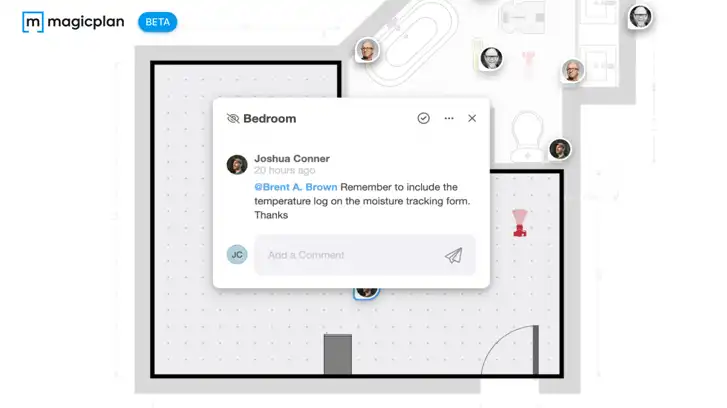
With the latest update, we added an option to comment on projects. The goal of the new commenting feature is to improve the collaboration between people who work on the same project.
The feature is currently in BETA and is available in the magicplan App & Cloud for all subscription tiers.
You can now:
Add comments related to the floor plan or specific objects
Move comments within the floor plan
Answer to the comments of others
Tag others in the comments
Mark comments as resolved or unread
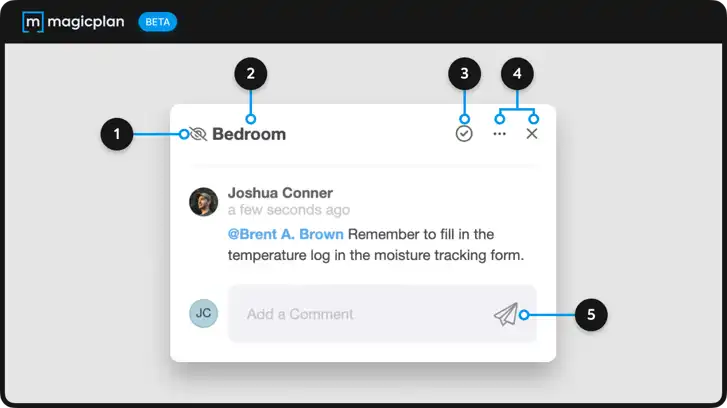
1. Hide/Unhide a comment
Pro tip: If you don't want comments to be displayed when sharing the project with a link, simply hide them by clicking the "Hide" icon.
2. Location of a comment on the floor plan
Comments can either be assigned to a floor (eg. ground floor, 1st floor), a room (eg. bathroom, bedroom), or an object (eg. toilet, bed).
3. Resolving a comment
Pro tip: Resolving a comment hides it from the floor plan view. You can still access all resolved comments under the "Resolved" tab on the right sidebar ("All threads").
4. Options
Includes the option of copying a direct link to the comment and deleting the comment.