The 7 Best Apps for Moisture-Log Documentation
Restoration
5 min read
Restoration contractors looking to streamline moisture log documentation face daily challenges, including missed readings, piles of paperwork, and constant pressure to satisfy insurance requirements. This guide delivers a straightforward look at a few leading apps for moisture log documentation — digital solutions that solve real-world headaches at job sites, to ensure quicker work approvals and payouts.
Why Moisture Log Apps Matter
Every water-damage restoration job rides on moisture logs, which prove that work was necessary, done right and completed on time. However, the old-school method of using paper logs has definite drawbacks. Paper logs are easy to lose, hard to organize, and rarely meet insurance carrier expectations — especially as more adjusters demand digital proof. Skipping digital documentation risks claim rejection, project delays, and lost profits.
Digital moisture-log apps solve these problems by letting contractors capture and store readings, photos, and notes instantly, thereby reducing disputes, eliminating lost forms, and showing proof of compliance with the IICRC S500 Standard for Professional Water Damage.
magicplan: The Complete Moisture Log Solution
Other Leading Moisture Log Apps
Encircle Hydro
Encircle offers strong photo capture and reporting tools, making it effective for anyone who needs to quickly show evidence of site conditions. Its ability to share reports directly with adjusters keeps claims moving, though it’s less ideal for those wanting advanced floor plan sketches or custom forms.
MICA
MICA software is valued for its ability to centralize field photos, moisture readings, and daily psychrometric data, producing clear, compliant, timestamped reports that facilitate claim communication and approvals. However, users report drawbacks such as a steeper learning curve for entering moisture data, interface challenges, occasional date glitches, slower support response compared to competitors.
Mitigate
MITIGATE software is designed specifically for water mitigation technicians, providing a modern interface that streamlines the documentation workflow — making regulatory compliance with industry standards straightforward and accessible. But it has a fairly steep learning curve compared to some competing apps.
Albi Drybook
Users appreciate Albi Drybook’s technician-friendly design, integrated workflow for documenting jobs, and comprehensive equipment tracking. However, some users report drawbacks such as occasional slow implementation of new features, small outages, and issues with remote access due to required connectivity.
iRestore
iRestore offers a user-friendly platform designed to keep customer documentation centralized. However, some users find the program slow to load, especially in areas with poor internet service, and some have reported difficulties with the initial sign-in process and the system’s responsiveness.
Job-Dox
Job-Dox is a flexible project documentation tool for smaller companies. It lets contractors track job notes, photos, and files in one place but offers fewer templates specific to moisture logs. Its simplicity and affordability make it a candidate for shops where versatility trumps specialty features.
LEARN MORE: The Right Tech for Restorers (TOP INDUSTRY TOOLS)
Comparison Chart
Here’s a practical comparison of all the apps mentioned above:
App Name 📲 | Key Strengths 💪 | Weaknesses ❌ | Best For 💡 |
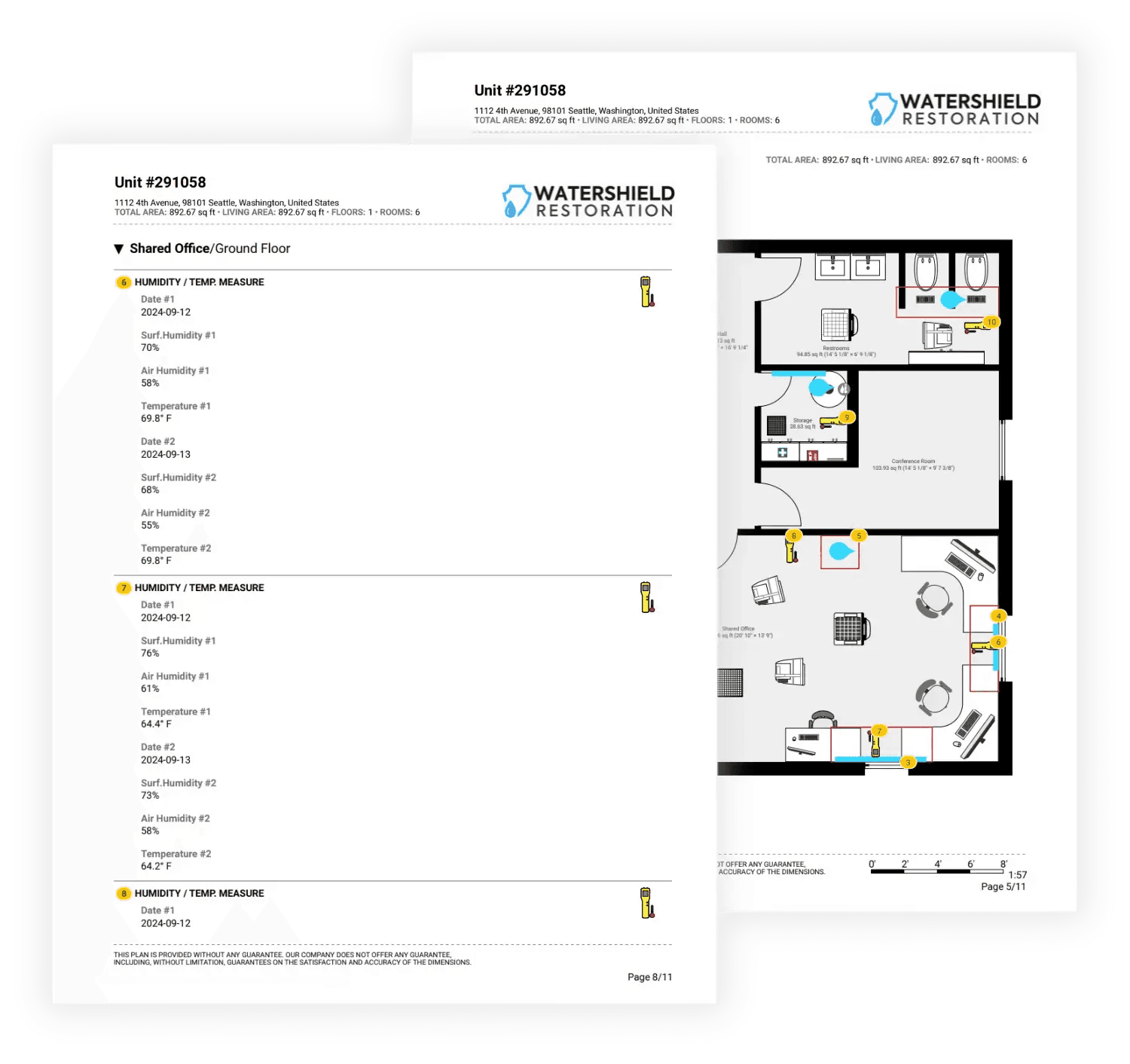
Real-time sketches, photos, notes and moisture readings in one platform; instant integration with Tramex moisture meters for fast data gathering; room-level tracking of moisture readings to ensure clarity; fast, easy PDF reporting; per-project pricing; offers a free trial, making it accessible for small businesses looking to test the software before committing | Somewhat of a learning curve for advanced features | Mitigation and restoration teams of all sizes that want to save more time when capturing and reporting data | |
Real-time moisture documentation with photo evidence; easy reporting; offers a free trial | Flat-fee pricing, which may be cost-prohibitive; no advanced sketching or custom forms; slow downloads and syncing delays can be problematic; learning curve can be confusing for technicians with less training; reports of miscategorized photos, with no easy way to fix them | Basic field reporting | |
Real-time moisture documentation with photo evidence | Flat-fee pricing; clunky interface; no sketching/mapping capabilities; reports of technical glitches; steep learning curve; no free trial | Large, multi-site projects | |
A mitigation-specific platform; instant floor plans; fast data syncing | A somewhat steep learning curve for teams transitioning from older workflows | Contractors specializing in mitigation | |
Technician-friendly design; documentation capabilities; | Flat-fee pricing; occasional slow implementation of new features, small outages, and remote-access issues | Mitigation and restoration teams of all sizes | |
User-friendly interface | Flat-fee pricing; reports of slow loading and difficulties with the system’s responsiveness | Mitigation and restoration teams of all sizes | |
Project-based documentation; offers a free trial | Flat-fee pricing; fewer moisture-specific features compared to other apps listed above | Small contractors with diverse needs |
Digital vs. Paper Logs: Practical Benefits for Contractors
Whichever app you end up choosing, know this — switching from handwritten paper logs to digital moisture logs produces measurable improvements:
Fewer missed readings:Apps prompt users for scheduled measurements and generate reminders.
Less actual paperwork to create, organize, and retrieve when needed:All data is stored securely in the cloud, ready for reporting or review. No filing cabinets required.
Faster job closeouts:Reports exported in carrier-ready formats will help diminish claim wait times.
Reduced disputes:Timestamped entries and photo evidence make it easy for adjusters and carriers to approve needed restoration work.
Beyond these benefits, an app like magicplan will allow teams to collaborate in real time, sharing updates instantly and streamlining communication between field techs and office staff.
Meeting Insurance and IICRC Requirements
Insurance carriers increasingly expect digital logs as proof of work. Apps that offer timestamping, customizable forms, and other beneficial documentation features help improve compliance with both carrier demands and IICRC standards.
Plus, investing in a professional, comprehensive and time-saving moisture-log app also signals professionalism and preparation during every claim review.
Conclusion
Choosing the right moisture log documentation app is no longer just about making fieldwork easier. It’s also about protecting profits, speeding up jobs, and delivering proof that satisfies both industry standards and insurance carriers. Whichever platform you chooses, digital logs can mean fewer headaches, better compliance, and faster payments on every job.
READ MORE:
LEARN HOW TO TRACK MOISTURE READINGS FASTER, EASIER WITH TRAMEX DEVICES
DISCOVER WHAT TO INCLUDE IN PROFESSIONAL WATER DAMAGE REPORTS