Flooring Professionals: Ditch Hand-Drawn Sketches and Do This Instead
Remodeling
6 min read

Roughly drawn sketches of residential job sites just aren’t adequate any more. So, it’s time to investigate a faster, easier, better method.
In fact, hand-drawn sketches have multiple drawbacks. These types of drawings are:
insufficient for addressing flooring-installation challenges
a poor representation of your plan for a project’s completion
not immediately shareable from the job site
often difficult for others to read/interpret
unprofessional and unimpressive in today’s technology age
So what can you do instead?
Download and use a digital floor plan app
This kind of “flooring company software” can be loaded on any mobile device, and uses smart technology to read and map a room’s dimensions. That means it will automatically measure and sketch any room accurately and quickly, with awesome-looking results. And without the need for remeasuring. A high-quality app will also provide resourceful tools – extra features to help you enhance each sketch with photos, objects and annotations.
It’s a much better method for working as a professional flooring planner who is in charge of performing job-site assessments.
Want to learn more? Read on to discover how you can use a floor plan app effectively during any initial in-home visit.

Visualize
Simply walk around a room with your mobile device to let the app capture the corners and calculate the dimensions. Then the app will do its “magic” by diagramming a floor plan.
Include Photos
Floor plans that include photos provide a more cohesive and comprehensive overview, as opposed to plans without photos. Fortunately, a good floor plan app will let you easily attach photos to any new floor plan you create. Here are a couple of tips to remember:
Include wide shots of each room where new flooring will be installed. This will help others visualize the space without actually standing in it. The inclusion of photos will also help remind you of your own visit to the site, to jog your memory and help solidify your recommendations for any next steps.
Add photos of all doorways and open transitions to adjoining spaces. This will help installers understand the space before beginning their actual work.
Combine Sketches of Adjoining Rooms When Planning Multi-Room Installations
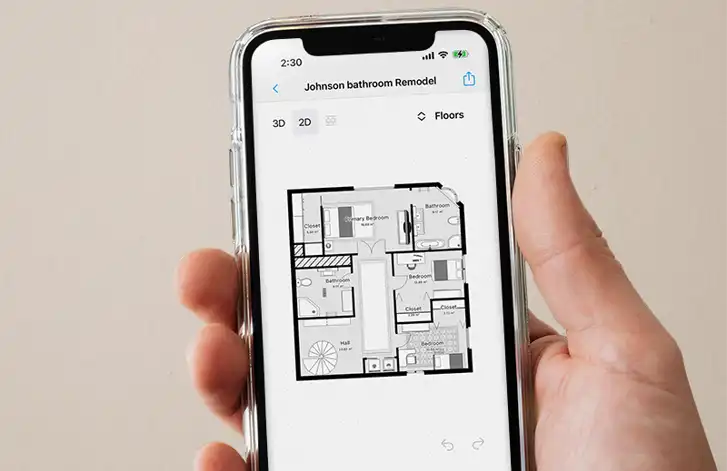
Does your customer want new flooring in two or more adjoining rooms? No problem. A first-rate floor plan app will let you assemble sketches of those individual rooms to create a single, comprehensive floor plan. This step will help you visualize the entire project at once.
Fine-Tune Your Overall Sketch with Extra Details
A detailed floor plan is far more useful than a basic, unadorned sketch. The purpose of adding extra details is to make the floor plan come to life, so that anyone viewing it can get a good sense of the space as you see it with your own eyes. A detailed plan also will help eliminate the risk of any confusion as to how the plan will be interpreted by anyone who sees it.
That’s why your floor plan app should allow you to add objects and annotations.
Objects can include structural features, cabinets, appliances, or large pieces of furniture that must be addressed during a flooring installation. Just be sure to add floor plan objects thoughtfully, and avoid cramming your plan with too many details that overwhelm the eyes.
Annotations can provide helpful information to benefit both the customer and your installers. Here are a few examples:
Room labels/names
Advice for removing the old flooring
Comments about the condition of the subfloor (which is especially important when you’re planning installation of hard
surface flooring, such as hardwood or tile, since imperfections in the subfloor can telegraph through the top surface)
Instructions for tearing out and replacing the subfloor, if necessary
Clarifications on any repairs or preparation work that is needed before a new floor is installed
Guidelines for the direction in which new flooring should be laid
Recommendations on where seams should be located
Instructions for treatment of door jambs/thresholds and transitions to other rooms
Guidance for where to place underfloor moisture barriers or heating elements, if applicable
Reminders about installing new baseboards or accessory items (e.g., floor-coordinating vent covers)
Any general project information that is important to include
Having all of these details collected in one, convenient floor plan document will be hugely helpful to everyone involved with the project.
So, What’s the Best Way to Select a Floor Plan App?
Be sure to look for one that:
is proven, commercial flooring software, designed for and used by professional flooring businesses
works with both Android and iOS platforms
has an easy-to-use interface
features augmented reality and artificial intelligence technology for automatic detection and calculation of room measurements
allows you to connect a laser distance meter via Bluetooth, for near-perfect measurement accuracy
will scan a room, using input from your mobile device’s camera and gyroscope sensors, to form a floor plan within minutes
permits you to build on that basic plan by adding photos, objects and annotations
includes a handy, built-in library of objects from which you can choose
permits you to transform a 2D plan into a 3D view
enables you to save your flooring plan design as a branded PDF document – one that you can easily email to your customer and your installation crew
helps you look more professional as a floor contractor
comes with an optional cloud service for storing, securing and accessing plans
Summary
A floor plan app is a terrific tool for planning flooring projects. When you arrive at a customer’s home with this type of app, you’ll be well-equipped to measure and sketch the workspace quickly and precisely. That means you’ll save time and achieve better results. Plus, you’ll also be able to turn your sketch into a shareable, polished-looking planning document. Once you try this more modern approach, you’ll never go back to doing hand-drawn sketches again!
Share
Download and use a digital floor plan app
Visualize
Include Photos
Combine Sketches of Adjoining Rooms When Planning Multi-Room Installations
Fine-Tune Your Overall Sketch with Extra Details
So, What’s the Best Way to Select a Floor Plan App?
Summary

Bernd Wolfram
CPO





