


MILESEEY Tools

MILESEEY Laser Measure magicplan Integration

Measurement tools

Measurement tools

Hardware

Hardware

MILESEEY TOOLS logo magicplan integration

About the integration

This integration connects MILESEEY laser distance meters directly to magicplan using Bluetooth. Restoration professionals can transmit physical jobsite dimensions into the mobile application to build accurate digital floor plans for mitigation and rebuilding documentation.

What it does

  • Capture physical dimensions using a green-beam laser or built-in camera system and send the data instantly to your mobile device.

  • Assign laser measurements directly to walls, doors, and windows within the floor plan editor to update room dimensions.

  • Document property losses with exact measurements to support structural drying layouts and material calculations.

  • Supplement floor plan data with real-time site photos using camera-enabled laser models.

How it works?

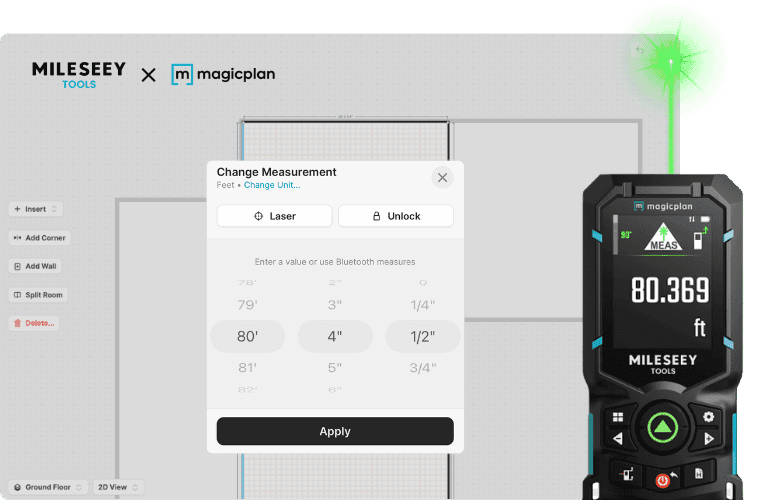
The MILESEEY hardware device connects to your smartphone or tablet via Bluetooth. When you take a measurement on-site, the tool transmits the distance value directly into the active magicplan project, updating the selected canvas element automatically.
magicplan laser mesurer mileseey

Requirements

  • Active magicplan account 

  • Supported MILESEEY laser distance meter (such as the S50R or S50C) 

  • Mobile device with Bluetooth capability 

  • magicplan mobile app installed on iOS or Android

How to set it up

  1. Turn on your MILESEEY laser measure and ensure Bluetooth is enabled on the device.

  2. Open the magicplan app on your mobile device and open a project.

  3. Navigate to the device settings or laser measure section within the app.

  4. Select your MILESEEY model from the list of available Bluetooth devices to pair them.

  5. Tap a wall or dimension line within your digital room layout.

  6. Take a measurement with the laser tool to populate the dimension value in the app.

Frequently Asked Questions

Which MILESEEY models are compatible with the app?

The ecosystem supports specific Bluetooth-enabled devices, including the S50R green-beam laser measure and the S50C green laser measure with an integrated camera.

Do I need a continuous internet connection to use the laser tool on a loss site?

No, the hardware connects directly to your mobile device using Bluetooth, allowing you to capture and log measurements offline while working inside damaged structures.

Where can I purchase the specialized laser measurement kit for this integration?

The S50R magicplan Edition Starter Kit can be purchased online through the official product page at https://mileseeytools.com/products/mileseey-s50r-magicplan-edition-starter-kit

Which MILESEEY models are compatible with the app?

The ecosystem supports specific Bluetooth-enabled devices, including the S50R green-beam laser measure and the S50C green laser measure with an integrated camera.

Do I need a continuous internet connection to use the laser tool on a loss site?

No, the hardware connects directly to your mobile device using Bluetooth, allowing you to capture and log measurements offline while working inside damaged structures.

Where can I purchase the specialized laser measurement kit for this integration?

The S50R magicplan Edition Starter Kit can be purchased online through the official product page at https://mileseeytools.com/products/mileseey-s50r-magicplan-edition-starter-kit

