Advanced Field Documentation: Elevating Project Reports
Umbau
6 min read
Documentation isn't just about ticking boxes. It's a vital tool for communicating complex project details accurately and effectively. This guide is crafted for contractors who are looking to enhance their fieldwork documentation and reporting techniques, ensuring every detail is captured precisely.
1. Documentation Essentials
Let's kick things off with the basics. Good documentation is more than just jotting down measurements and tasks. It's about painting a clear picture of your project's progress.
Changing Room Colors for Clarity
Visual cues can be incredibly effective. For example, when managing a renovation project that involves several rooms, using a color-coded system can make a significant difference. Assigning red to areas that require major work, yellow for minor repairs, and green for completed sections simplifies progress tracking. Moreover, it makes it easier for your team to identify their next tasks by just glancing at the colors.

Integrating Photos and Notes
In the digital age, the ability to attach photos and notes directly to your digital plans is invaluable. This practice transforms your documentation into a living document, rich with real-time updates. Photos can capture nuances that words can't, and notes placed strategically on the plan provide context that can prevent costly misunderstandings.
Photo Markup for Precision
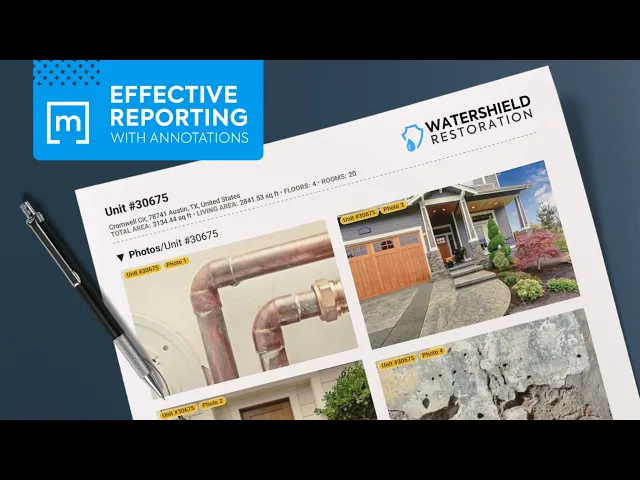
Annotation on photos can highlight specific elements, such as a crack in a wall or a unique element in the property that needs special attention. This level of detail in your reports can greatly enhance the understanding of the project's requirements and progress among your team and clients.

2. Objects Annotations
Annotations bring an additional layer of specificity to your documentation, turning generic plans into detailed guides.
Using Annotation Objects Effectively
Implementing annotation objects like markers or labels can significantly enhance the communicative value of your plans. For example, marking a water damage spot clearly on the plan helps in prioritizing repair work and ensures that no critical issue is overlooked.

360° Panoramas for Comprehensive Virtual Tours
Traditional flat layouts have limitations in conveying the true sense of space. Utilizing magicplan's 360° panoramas can give you and your clients a much more immersive and realistic view of the project area, aiding in better spatial understanding and planning.

3. Custom Objects Manager (COM)
Customization is key in a field where no two projects are the same. The Custom Object Manager (COM) isn't just a feature; it's your tool for making every plan as unique as the project it represents.
Creating Custom Objects
In restoration work, standard objects often don't cut it. You might need to represent a bespoke piece of architecture or a unique structural element. The COM allows you to bring these unique elements into your plans. Whether you're adding a special type of window or an unconventional room layout, this tool helps ensure your documentation is as accurate and tailored as the work you do.

4. Collecting Data in a Uniform Way
For any type of field assessment, the way you collect and organize data can make a significant difference. This involves two key magicplan components: Custom Attributes and Custom Forms, each playing a unique role in data standardization and efficiency.
Custom Attributes for Detailed Data Capture
Custom attributes are like your data tags. They help in categorizing and defining specific details of your project elements. For instance, if you're working on window installations, attributes could include the type of glass, type of frame, or installation dates. By setting these attributes, you ensure that every piece of data collected is relevant and standardized, making it easier to understand, compare, and analyze across different projects or stages.
Custom Forms for Streamlined Data Entry
While attributes tag the details, Custom Forms are about how you gather general information. Forms can be designed to capture a range of data points efficiently — from checklists for site inspections to detailed questionnaires for client requirements. The advantage of custom forms lies in their adaptability; they can be tailored to the specific needs of each project, ensuring that all necessary information is gathered systematically and nothing important is missed.
For any type of field assessment, the way you collect and organize data can make a significant difference. This involves two key magicplan components: Custom Attributes and Custom Forms, each playing a unique role in data standardization a
Custom Attributes for Detailed Data Capture
Custom attributes are like your data tags. They help in categorizing and defining specific details of your project elements. For instance, if you're working on window installations, attributes could include the type of glass, type of frame, or installation dates. By setting these attributes, you ensure that every piece of data collected is relevant and standardized, making it easier to understand, compare, and analyze across different projects or stages.
Custom Forms for Streamlined Data Entry
While attributes tag the details, Custom Forms are about how you gather general information. Forms can be designed to capture a range of data points efficiently — from checklists for site inspections to detailed questionnaires for client requirements. The advantage of custom forms lies in their adaptability; they can be tailored to the specific needs of each project, ensuring that all necessary information is gathered systematically and nothing important is missed.

5. Collaboration
Restoration is a team sport, and collaboration is its lifeblood. In an industry where plans can change at a moment's notice, effective collaboration tools are invaluable.
The Role of Commenting
Here's where the magicplan commenting feature becomes a game-changer. It's not just about leaving notes; it's a platform for dialogue. Whether it's a quick update, a major change, or a creative suggestion, commenting enables real-time communication among team members, streamlining decision-making and ensuring everyone's on the same page.

6. Exploring Creative Uses
The flexibility of advanced documentation tools like magicplan opens up a world of creative possibilities. Here are three creative ways contractors have used these tools to enhance their projects:
Experimenting with Furniture Arrangements: One of the more playful yet practical applications is using documentation tools for virtual furniture arrangement. Contractors and designers have utilized floor plans to experiment with different furniture layouts before any physical moving takes place.

Creating Visual Sequences for Project Progress: Another innovative use is charting out the project's progress through visual sequences, which not only provide a clear and engaging way to track progress but also serve as a valuable record for clients and stakeholders to see the transformation of their space from start to finish.

Detailing Material Choices with Annotations and Custom Attributes: Detailing material choices is crucial, especially in projects where aesthetics and functionality are key. Contractors have used custom attributes and custom forms to detail out specifics like floor types, paint hues, and fixture materials. This practice not only aids in accurate record-keeping but also ensures that all involved parties are aligned on the material specifications, reducing the risk of misunderstandings and errors in procurement and installation.

7. Exporting and Sharing
The final step in the documentation process is sharing your work, and it's here that the true collaborative nature of your project shines.
Efficient Report Sharing
Whether you're sharing a detailed PDF report with a client or an interactive digital plan with your team, the ability to export and share information quickly and effectively is crucial, this magicplan capability ensures that everyone involved, from clients to subcontractors, has access to the latest information, fostering transparency and trust in your work.

Conclusion
Enhancing your documentation techniques is an investment in the clarity and efficiency of your projects. With these advanced strategies, your reports become more than just a formality; they transform into a comprehensive narrative of your work, enabling better decision-making, clearer communication, and ultimately, more successful project outcomes.
Share
1. Documentation Essentials
2. Objects Annotations
3. Custom Objects Manager (COM)
4. Collecting Data in a Uniform Way
5. Collaboration
6. Exploring Creative Uses
7. Exporting and Sharing
Conclusion

Bernd Wolfram
CPO





