Custom Forms: Templates for Inspections and Reporting
Inside magicplan
3 min read


By

Sam Miller
RevOps Manager
Share
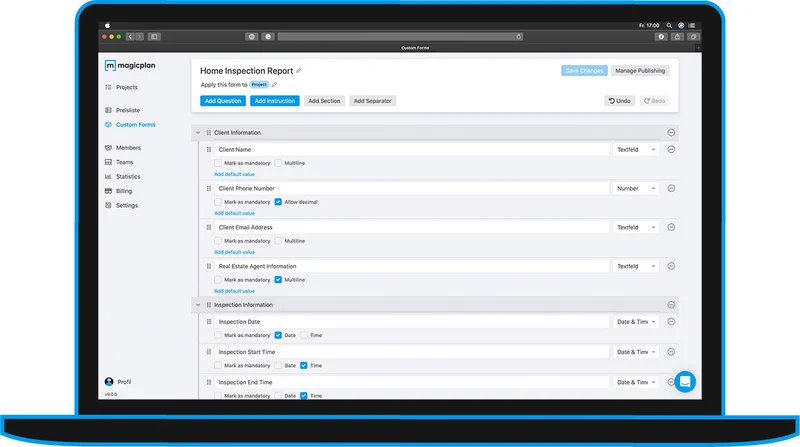
Custom Forms are an easy way to create templates for your inspection and reporting process. Forms are created and managed in the magicplan Cloud. Once completed, they can be published to the magicplan App and shared with your Workspace and Team members. Forms can be exported in the Report PDF.
Learn everything about Custom Forms in the Help Center.


What are Custom Forms?
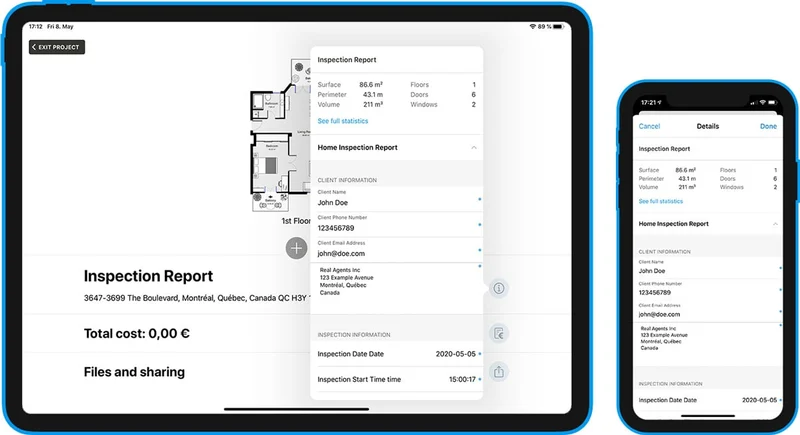
Forms provide a structured workflow for you to collect information. The magicplan Cloud allows you to create templates with lists of questions that can be assigned to the overall project, floors, rooms or objects.
By using Custom Forms, you can easily:
add a set of questions to a form
format by adding sections and separators
apply logic to create follow-up questions
organize questions using drag and drop
mark important questions as mandatory
assign forms to a specific context (project, floor, room, object)
share form templates to your Workspace and Team members
Question types include:
Yes/No questions
Drop-down questions
Text Fields
Distance (includes imperial and metric units)
Number
Photo (add photos from the gallery or camera)
Color (color selector of the app)
Date and Time
Forms provide a structured workflow for you to collect information. The magicplan Cloud allows you to create templates with lists of questions that can be assigned to the overall project, floors, rooms or objects.
By using Custom Forms, you can easily:
add a set of questions to a form
format by adding sections and separators
apply logic to create follow-up questions
organize questions using drag and drop
mark important questions as mandatory
assign forms to a specific context (project, floor, room, object)
share form templates to your Workspace and Team members

Question types include:
Yes/No questions
Drop-down questions
Text Fields
Distance (includes imperial and metric units)
Number
Photo (add photos from the gallery or camera)
Color (color selector of the app)
Date and Time

What's coming
In futures releases, we will be adding a dedicated interface in the app to fill forms and collect reporting data in general. This interface will offer a structured view to work through a predefined Form.
If you want to learn more about magicplan’s reporting capabilities or have questions around this update, reach out to our sales team.
In futures releases, we will be adding a dedicated interface in the app to fill forms and collect reporting data in general. This interface will offer a structured view to work through a predefined Form.
If you want to learn more about magicplan’s reporting capabilities or have questions around this update, reach out to our sales team.
Related Articles


Claims Adjuster
Xactimate®, Cotality™, QuickBooks, T&M: When and How to Use Each Effectively
5 min read


Restoration
Running Lean: How 2-Person Restoration Crews Can Run Like Pros
5 min read


Restoration
The Definitive Restoration Workflow Guide: How to Make Every Job Flow Seamlessly
5 min read

Claims Adjuster
Xactimate®, Cotality™, QuickBooks, T&M: When and How to Use Each Effectively
5 min read

Restoration
Running Lean: How 2-Person Restoration Crews Can Run Like Pros
5 min read

Restoration
The Definitive Restoration Workflow Guide: How to Make Every Job Flow Seamlessly
5 min read

Restoration
6 Tips for Optimizing Restoration Data Privacy (and Why That Matters)
4 min read

© 2026 magicplan. All Rights Reserved.

© 2026 magicplan. All Rights Reserved.

© 2026 magicplan. All Rights Reserved.