



Jobber magicplan integration

Project management

Project management

Software

Software

jobber logo and magicplan integration zapier

About the integration

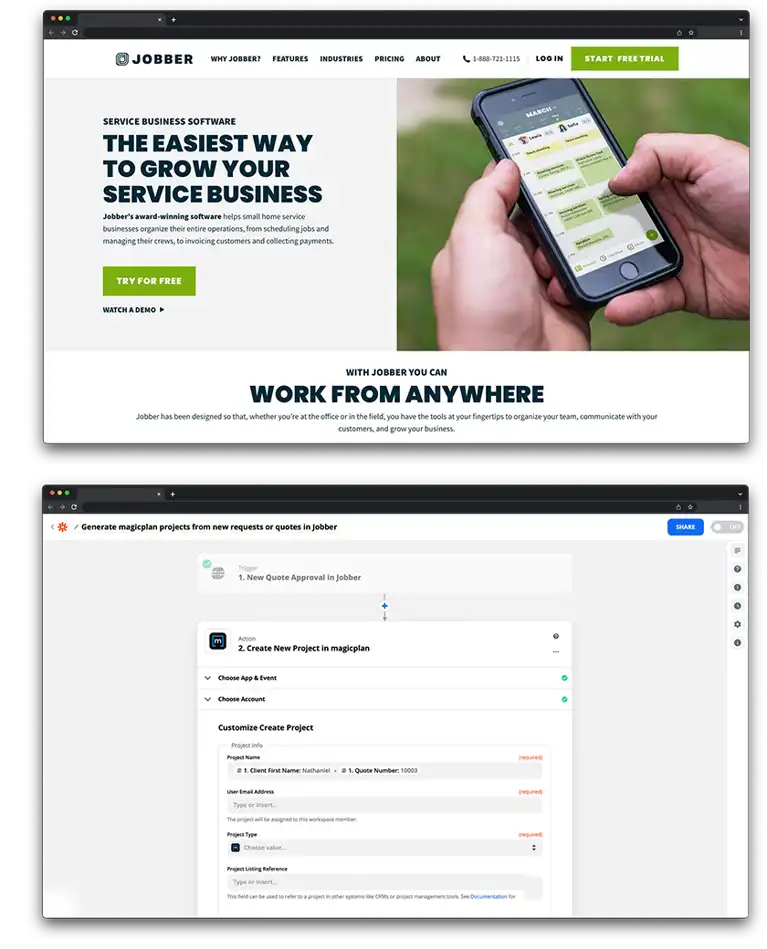
This integration connects Jobber with magicplan to sync work requests and customer information. It allows you to automate the dispatching of projects to field technicians and ensures property data is consistent across both platforms.

This integration connects Jobber with magicplan to sync work requests and customer information. It allows you to automate the dispatching of projects to field technicians and ensures property data is consistent across both platforms.

What it does

  • Create new magicplan projects automatically when a new request is submitted in Jobber.

  • Generate magicplan projects automatically when a new quote is created in Jobber.

  • Sync customer names, phone numbers, and property addresses from Jobber directly into magicplan.

  • Update Jobber records with links to completed magicplan floor plans.

How it works?

The connection uses Zapier to link Jobber events with magicplan actions. When a request or quote is generated in Jobber, Zapier sends the relevant details to magicplan to initiate a new project. This removes the need for technicians to manually enter customer data on-site.

Requirements

  • Active magicplan account

  • Jobber account (Connect plan or higher for Zapier access)

  • Zapier account

How to set it up

  1. Log in to your Zapier account.

  2. Select Jobber and magicplan from the app library.

  3. Choose a trigger from Jobber, such as "New Request" or "New Quote."

  4. Choose the action "Create Project" for magicplan.

  5. Authorize access to both your Jobber and magicplan accounts.

  6. Map the Jobber data fields to the corresponding project fields in magicplan.

  7. Test the trigger to ensure the project is created with the correct address and customer info.

  8. Turn on the Zap.


Frequently Asked Questions

Can I trigger a magicplan project from a Jobber Job instead of a Request?

Yes, you can choose "New Job" as the trigger in Zapier if you prefer projects to be created only after a job is scheduled.

Will files from magicplan automatically attach to the Jobber client record?

You can set up an additional action in Zapier to send exported magicplan files or URLs back to Jobber as a Note or Attachment.

Does this integration work on the Jobber mobile app?

The integration runs in the background. Once set up via Zapier, technicians will see the new projects appear in their magicplan mobile app automatically after the trigger event occurs in Jobber.

Can I trigger a magicplan project from a Jobber Job instead of a Request?

Yes, you can choose "New Job" as the trigger in Zapier if you prefer projects to be created only after a job is scheduled.

Will files from magicplan automatically attach to the Jobber client record?

You can set up an additional action in Zapier to send exported magicplan files or URLs back to Jobber as a Note or Attachment.

Does this integration work on the Jobber mobile app?

The integration runs in the background. Once set up via Zapier, technicians will see the new projects appear in their magicplan mobile app automatically after the trigger event occurs in Jobber.

Can I trigger a magicplan project from a Jobber Job instead of a Request?

Yes, you can choose "New Job" as the trigger in Zapier if you prefer projects to be created only after a job is scheduled.

Will files from magicplan automatically attach to the Jobber client record?

You can set up an additional action in Zapier to send exported magicplan files or URLs back to Jobber as a Note or Attachment.

Does this integration work on the Jobber mobile app?

The integration runs in the background. Once set up via Zapier, technicians will see the new projects appear in their magicplan mobile app automatically after the trigger event occurs in Jobber.