




Gmail magicplan integration

Project management

Project management

Software

Software

gmail logo and magicplan integration zapier

About the integration

This integration connects Gmail with magicplan to automate email notifications and file distribution. It allows you to send project updates, floor plans, and site photos to team members or customers automatically.

This integration connects Gmail with magicplan to automate email notifications and file distribution. It allows you to send project updates, floor plans, and site photos to team members or customers automatically.

What it does

  • Send automated emails via Gmail whenever a new file is generated in magicplan.

  • Distribute exported project photos to specific recipients automatically.

  • Email floor plan PDF reports to customers as soon as they are exported.

  • Notify team members via email when a new project is created or updated in magicplan.

How it works?

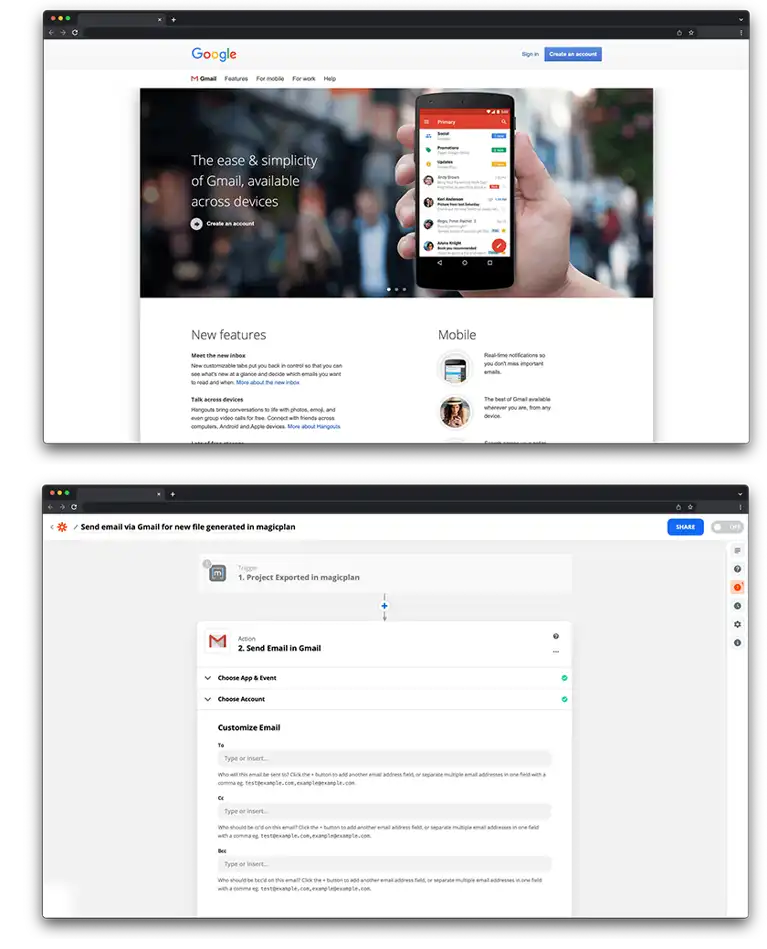
The connection uses Zapier to link Gmail and magicplan. When a trigger event occurs in magicplan, such as a file export, Zapier uses your Gmail account to send an email with the project details or attachments to a designated address.

Requirements

  • Active magicplan account

  • Google account with Gmail enabled

  • Zapier account

How to set it up

  1. Log in to your Zapier account.

  2. Select magicplan and Gmail from the app list.

  3. Choose a trigger from magicplan, such as "New Export."

  4. Choose the action "Send Email" for Gmail.

  5. Authorize your magicplan and Gmail accounts.

  6. Customize the email by mapping magicplan project fields to the "To," "Subject," and "Body" sections.

  7. Attach the magicplan export file to the email template in Zapier.

  8. Test the connection and turn on the Zap.

Frequently Asked Questions

Can I send emails to multiple people at once?

Yes, you can enter multiple email addresses in the "To," "Cc," or "Bcc" fields when setting up the Gmail action in Zapier.

Will the email include the actual file or just a link?

You can choose to either include a public download link in the email body or attach the actual file directly to the email.

Can I use a custom email template?

Yes, you can use the Zapier editor to format the email body with project-specific information and your own text.

Can I send emails to multiple people at once?

Yes, you can enter multiple email addresses in the "To," "Cc," or "Bcc" fields when setting up the Gmail action in Zapier.

Will the email include the actual file or just a link?

You can choose to either include a public download link in the email body or attach the actual file directly to the email.

Can I use a custom email template?

Yes, you can use the Zapier editor to format the email body with project-specific information and your own text.

Can I send emails to multiple people at once?

Yes, you can enter multiple email addresses in the "To," "Cc," or "Bcc" fields when setting up the Gmail action in Zapier.

Will the email include the actual file or just a link?

You can choose to either include a public download link in the email body or attach the actual file directly to the email.

Can I use a custom email template?

Yes, you can use the Zapier editor to format the email body with project-specific information and your own text.


