Water Mitigation Documentation Software
Document Moisture and Drying Progress
Document Moisture and Drying Progress
Keep track of your water mitigation efforts from start to finish.
Sketch, moisture map, and scope — one visit
No re-entering data back at the office
Report and ESX ready before you leave the site


Prueba magicplan gratis. No se requiere tarjeta de crédito.

From First Call to Dry-Out. No Paperwork Backlog
Water mitigation moves fast. Your documentation should keep up. magicplan connects what your techs capture on-site to the scopes, reports, and approvals waiting back at the office.
SITE DOCUMENTATION
Capture the full picture on-site
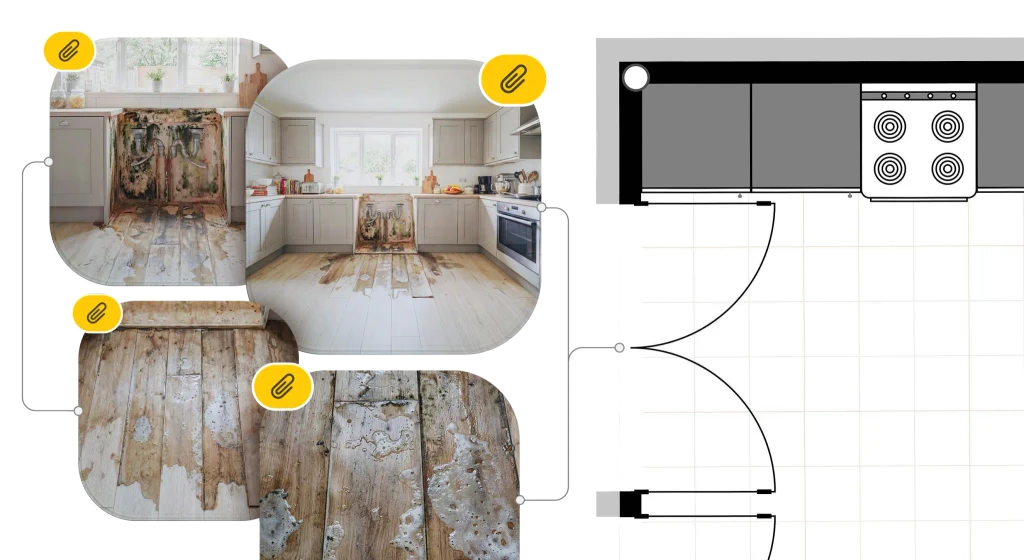
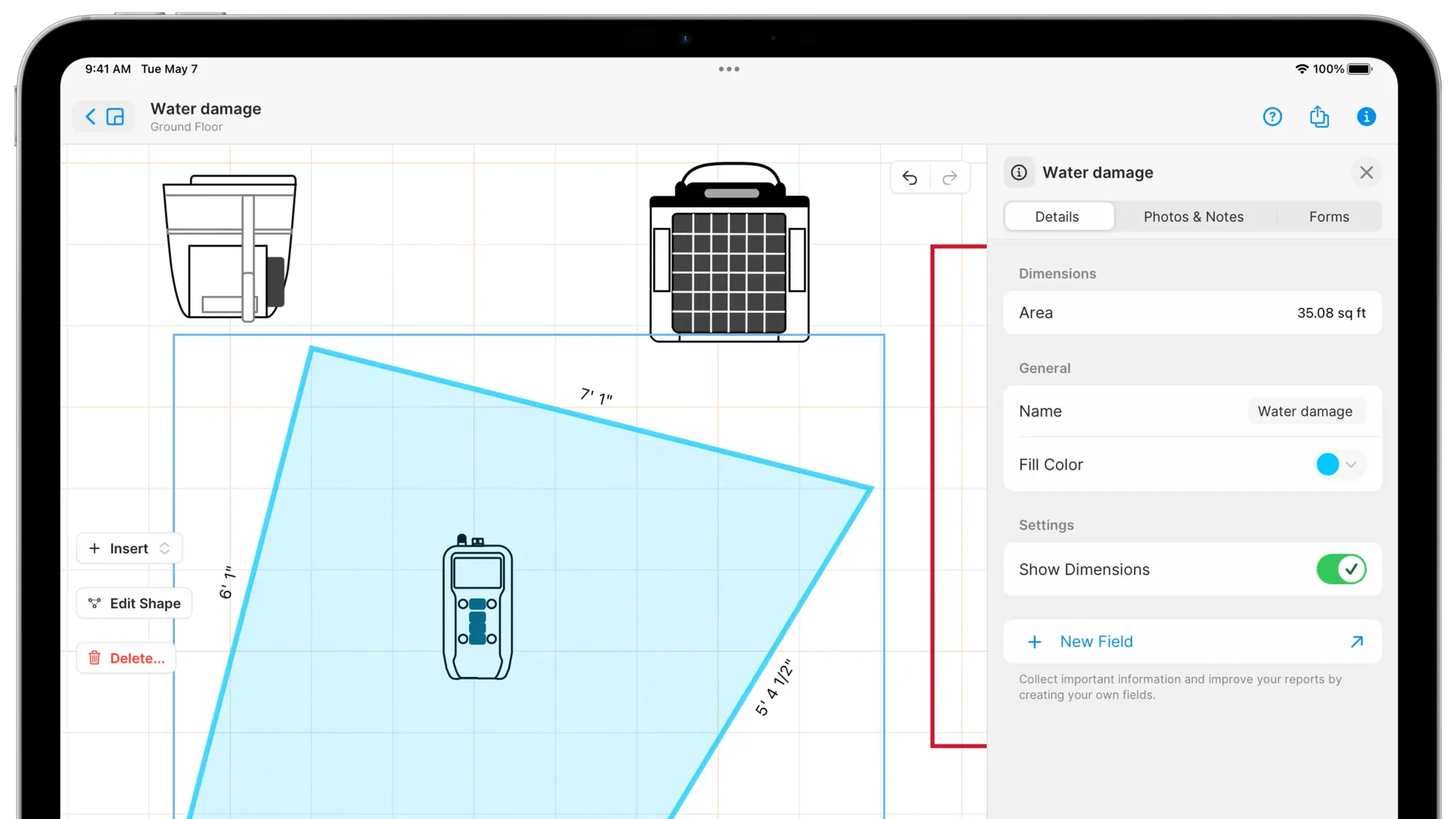
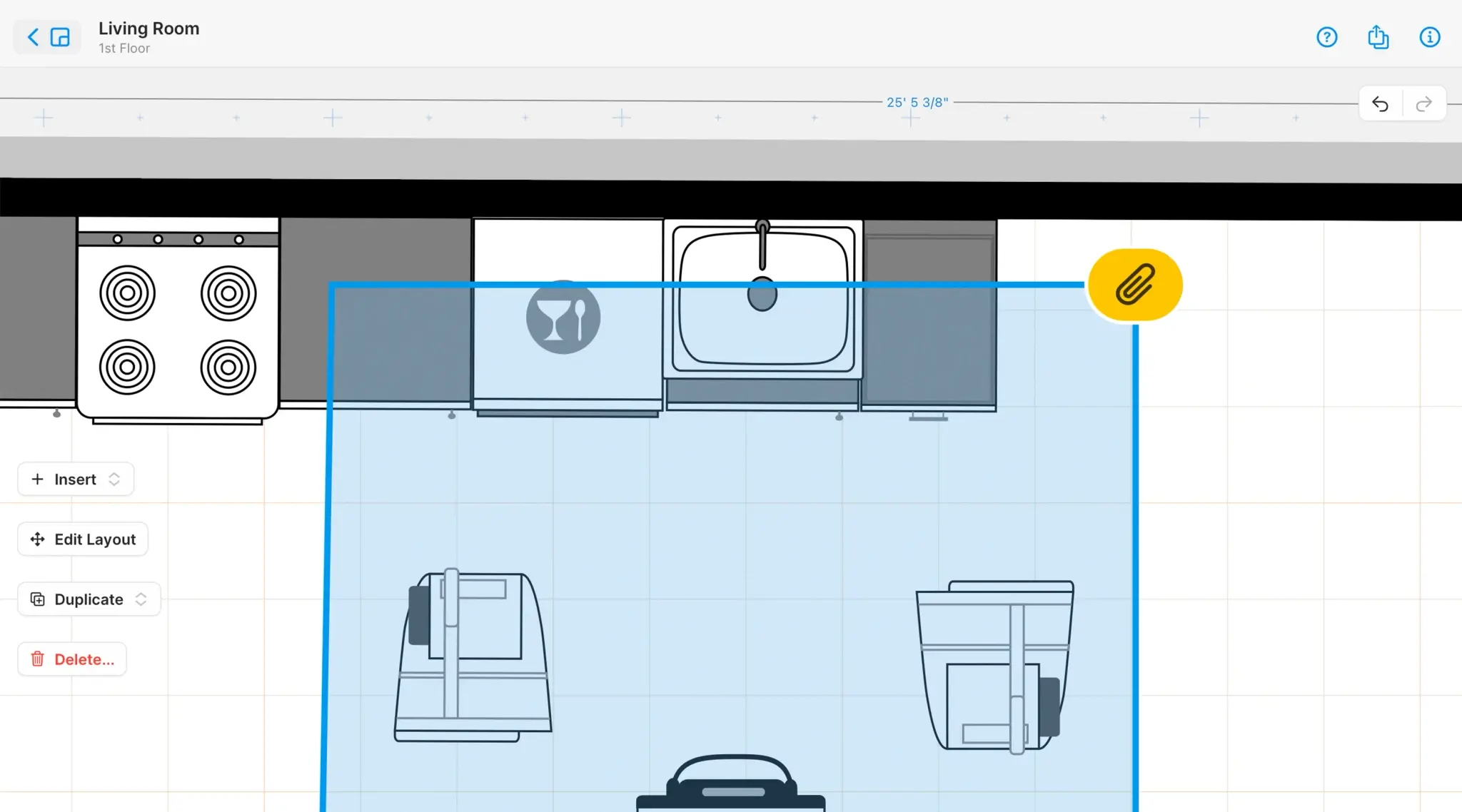
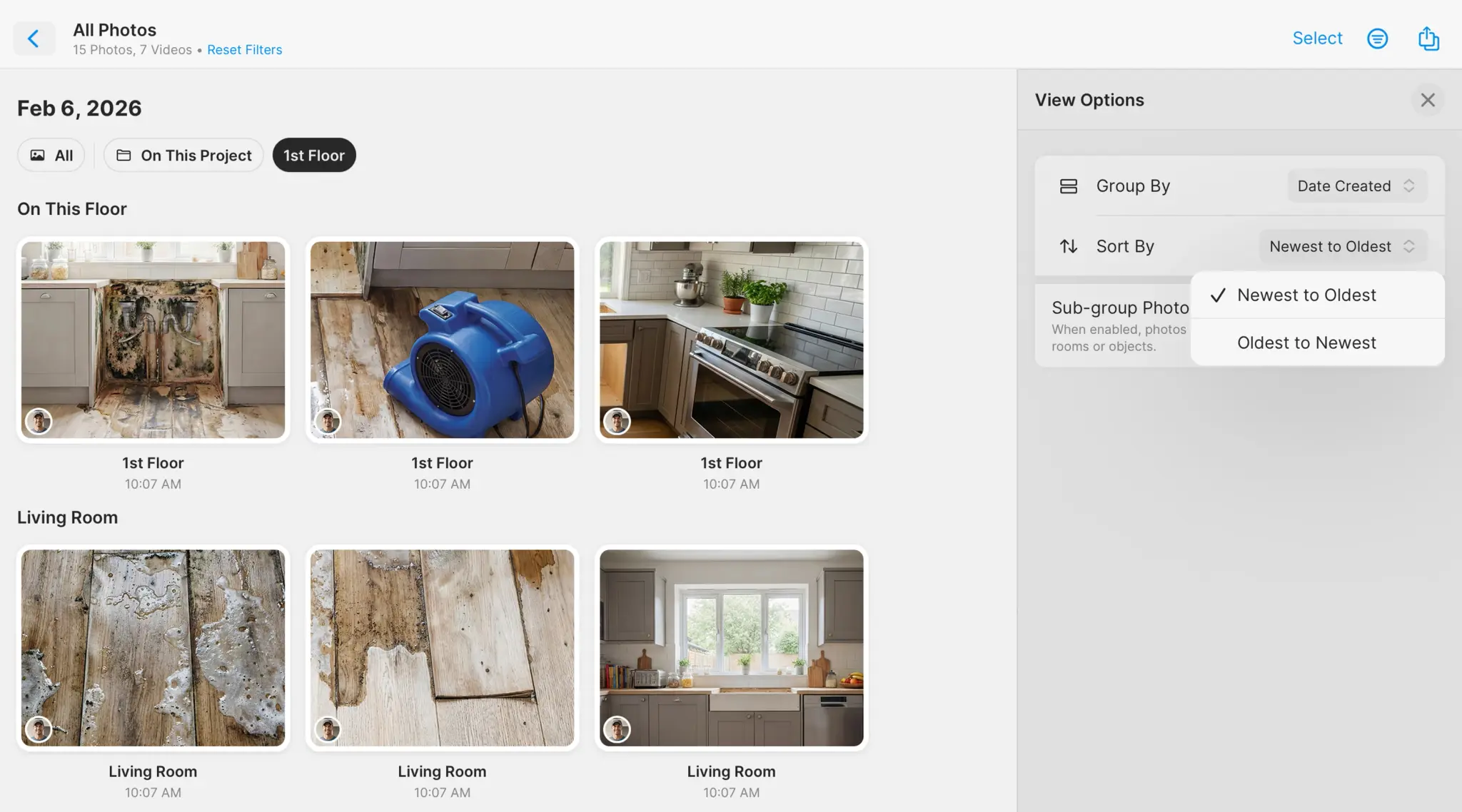
Sketch the space, draw affected areas on floors and walls, and attach photos — all in one project.
MOISTURE MAPPING
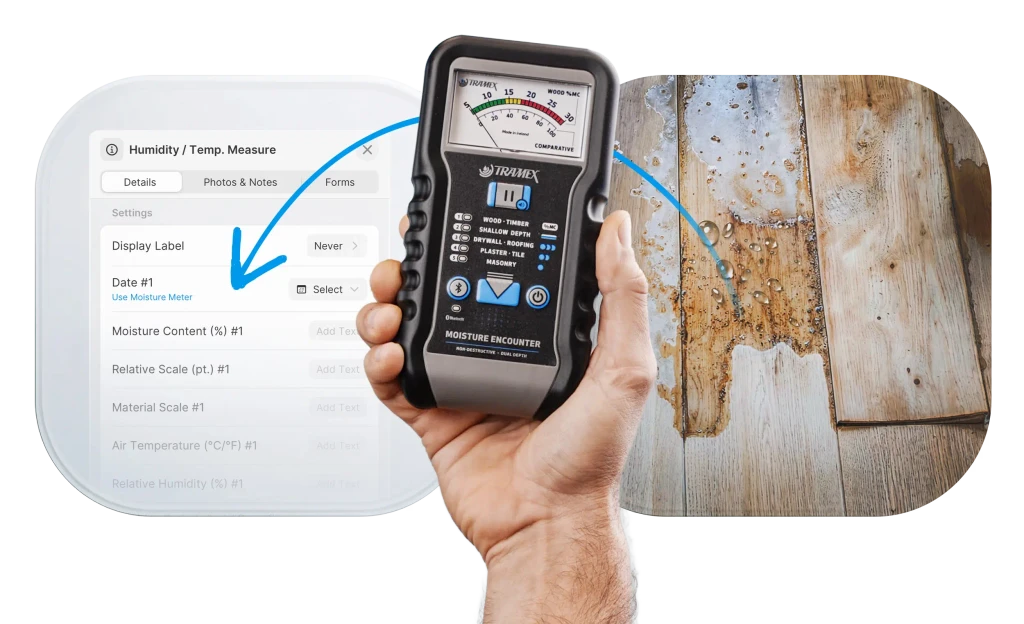
Map moisture where it actually happened
Log readings directly on your floor plan. Color-coded zones show what's wet and what's drying — day by day.
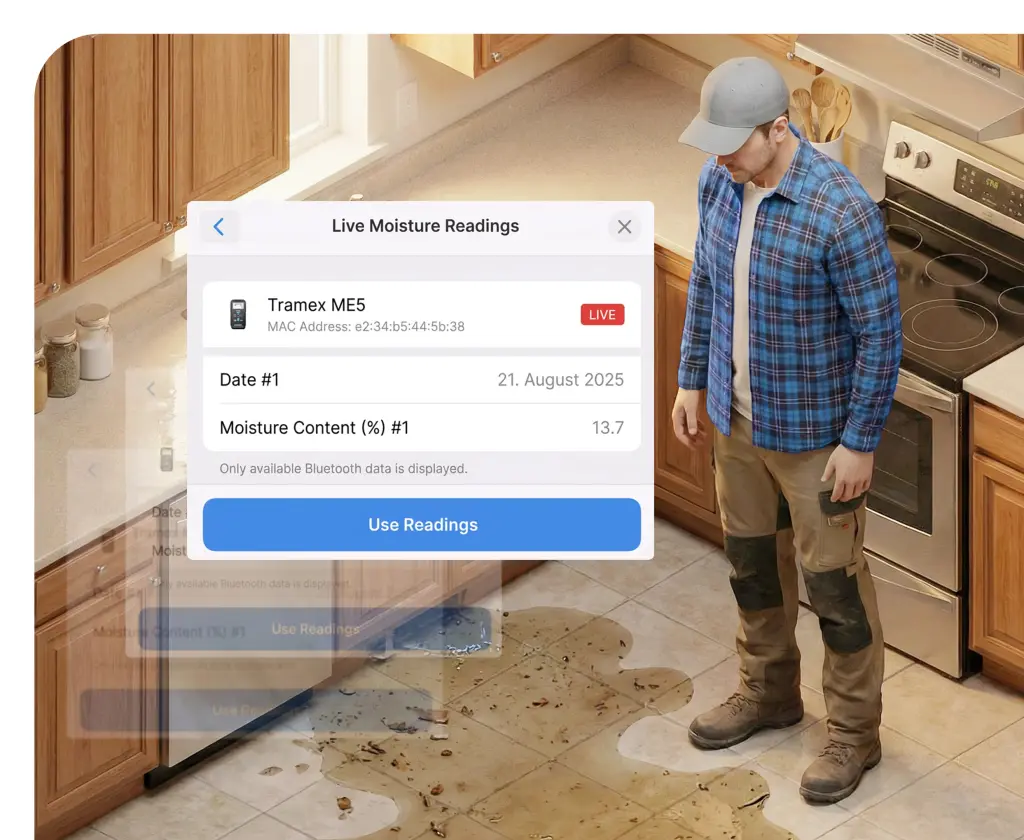
EQUIPMENT TRACKING
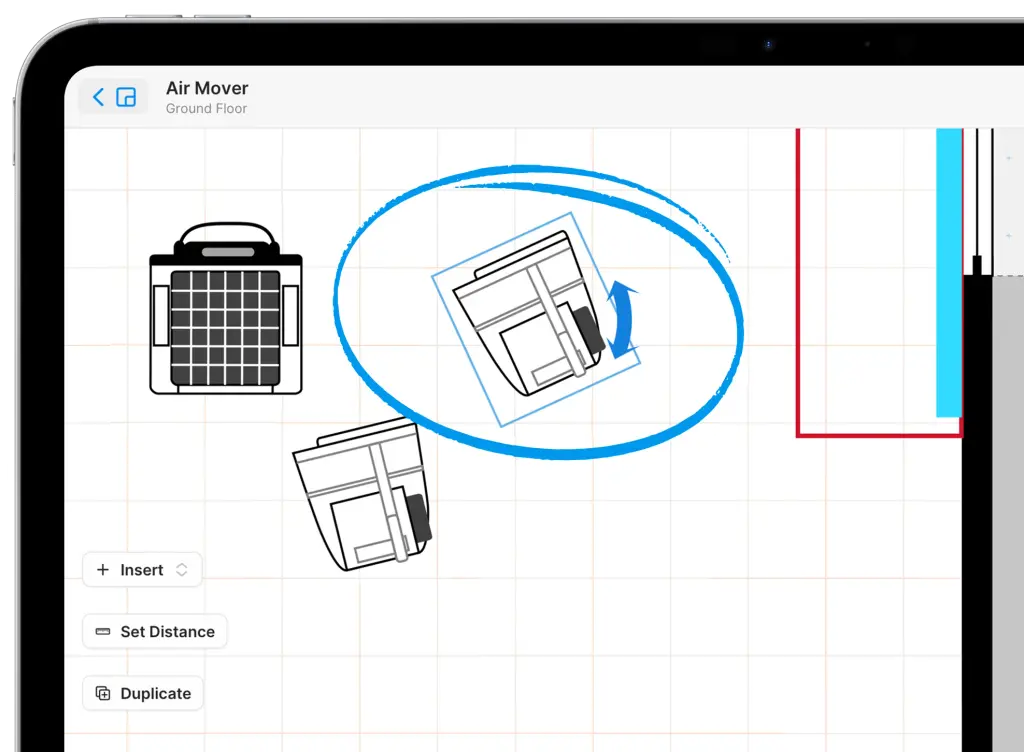
Track equipment placement and justify every day
Log every piece of equipment from dehumidifiers to air movers. Manage usage, location, and deployment times to simplify billing.
REAL-TIME JOB MONITORING
Office sees the job as it happens
Floor plan updated? Synced. Moisture reading logged? Synced. Your PM doesn't need to call the tech to know what's happening.
STANDARD OPERATING PROCEDURES
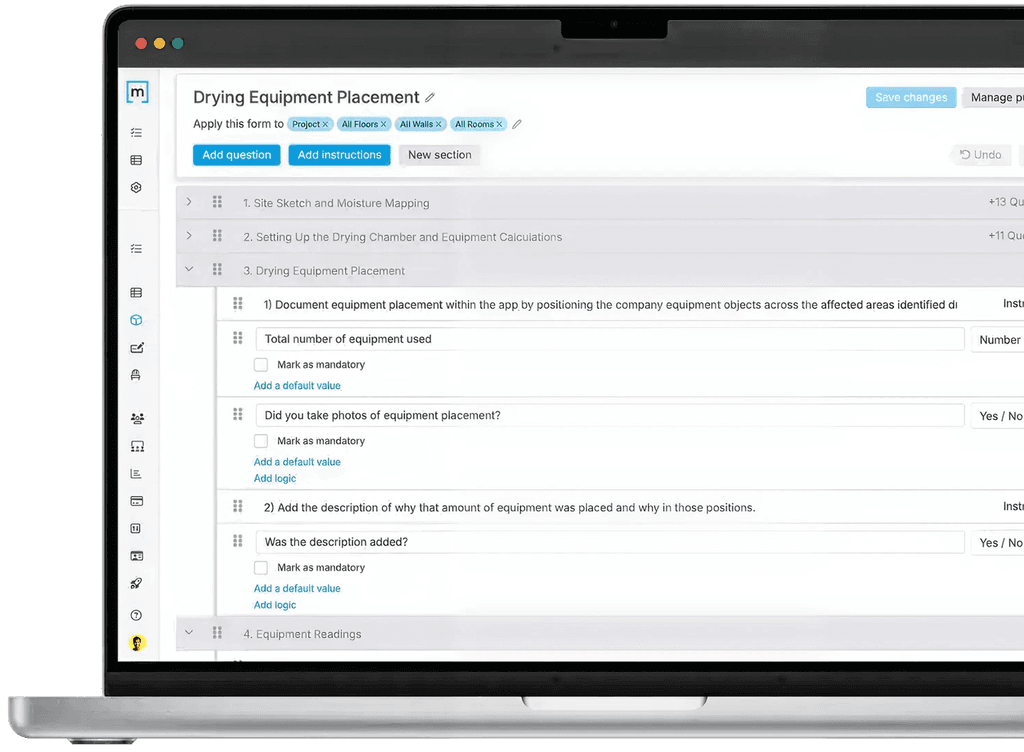
Guide your techs with water mitigation SOPs
Build drying checklists your crew actually follows. Same process, every tech, every job — so nothing gets missed and nothing gets disputed.





Built for water mitigation crews
See It on a Real Water Job
Book a 15-minute demo. We'll show you exactly how crews are documenting and getting paid faster.
Built for water mitigation crews
See It on a Real Water Job
Book a 15-minute demo. We'll show you exactly how crews are documenting and getting paid faster.
Every reading. Every piece of equipment. Every affected area.
The Full Story on Every Water Job
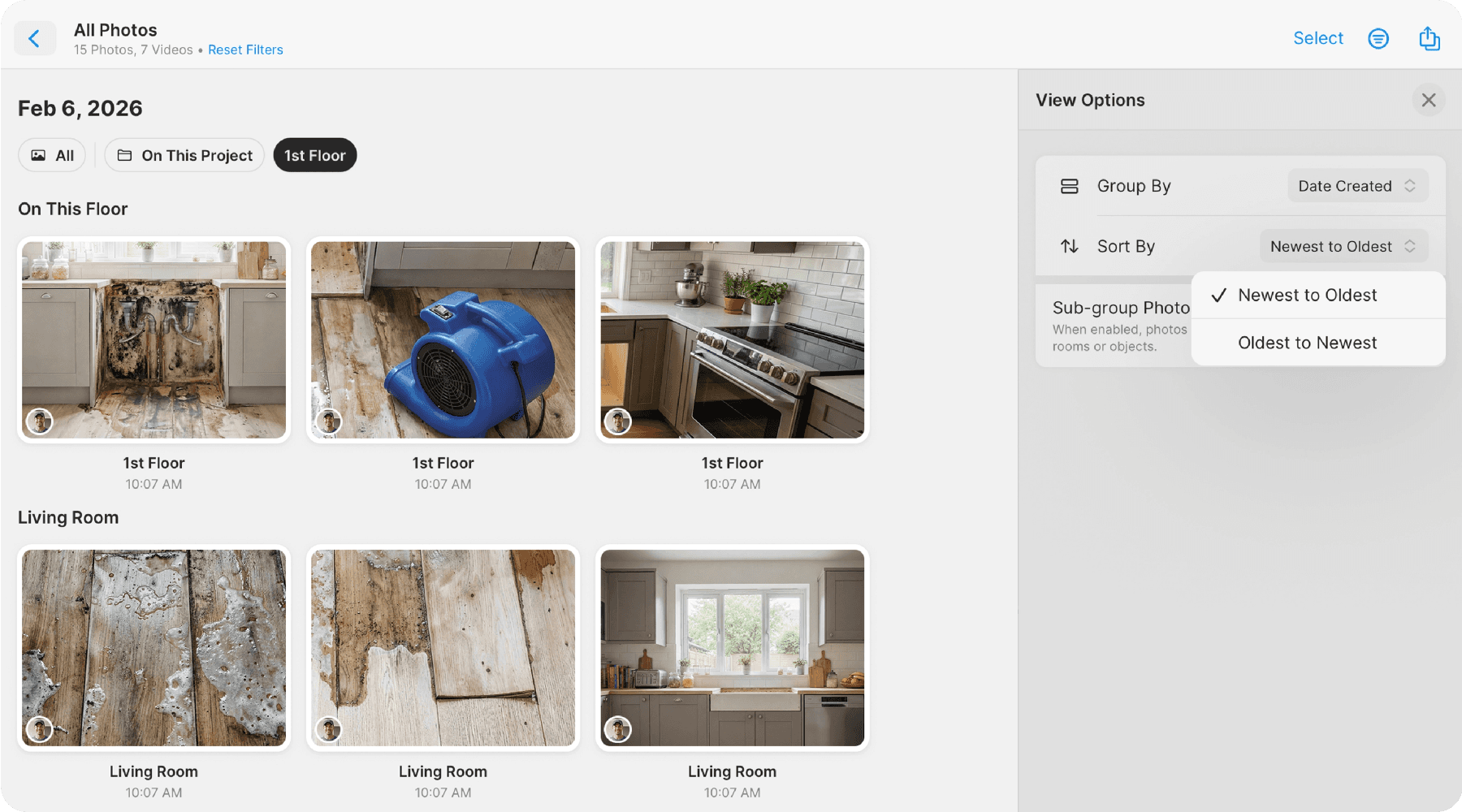
Share complete documentation with adjusters, carriers, and property managers — everything they need to approve the claim, with nothing left to question.
Documentación Visual
Affected Areas
Dry Logs & Moisture Readings
Documentación Visual
Affected Areas
Dry Logs & Moisture Readings
Documentación Visual
Affected Areas
Dry Logs & Moisture Readings
Testimonios
Hecho para la obra. Usado por miles de equipos en construcción y restauración.
Equipos que lo utilizan a diario
Proyectos Documentados
Fotos Tomadas
Me encanta esta aplicación y he visto cómo ha crecido a lo largo de los años. Recientemente tuvimos una inundación por tuberías congeladas, ayudó muchísimo.
Ben.Zoh
25/02/2024
APP STORE
magicplan es un cambio de juego para cualquiera que busque crear, documentar y presupuestar rápidamente espacios interiores. Efectivamente cierra la brecha entre el dibujo simple y el CAD complejo, aprovechando la tecnología móvil para optimizar el flujo de trabajo en el sitio.
Robertconleysr
30/10/2025
APP STORE
¡Una gran experiencia! La aplicación es intuitiva y tiene buenas opciones para muebles y habitaciones; finalmente, los informes facilitan mucho la vida del usuario.
Alex Sandro
28/12/2025
PLAY STORE
Descargué y probé muchas aplicaciones para crear planos de planta con LiDAR y Magicplan es la mejor. Utilizando un iPhone 14 Pro Max, midió de manera brillante y añadir color a las habitaciones fue muy fácil. Te dan dos espacios de plano de planta gratis para que puedas relajarte y conocer bien la aplicación.
thedronecoach.com
20/04/2024
PLAY STORE
Esta aplicación es muy útil si deseas construir una casa, te ayuda a planificar fácilmente. Esta aplicación realmente cumple su propósito, me encanta. 🥰🥰🥰
Sai Jade Bayotas
19/01/2026
PLAY STORE
Aplicación absolutamente fantástica para planificar la decoración de habitaciones, especialmente con las cámaras LiDAR en el iPhone Pro o iPad Pro.
719809
06/01/2024
APP STORE
Fácil de usar en el sitio: creaciones y ajustes rápidos de diseño para planificación de espacios interiores arquitectónicos artísticos. Interpretación de elementos y disposiciones.
SeasideJune
07/02/2026
APP STORE
Honestamente... la aplicación es increíble, ¡posibilidades infinitas! Pude organizar toda mi casa antes de mover cualquier mueble y me ahorró muchos dolores de cabeza.
Exe Carrillo
01/16/2026
PLAY STORE
Testimonios
Hecho para la obra. Usado por miles de equipos en construcción y restauración.
Me encanta esta aplicación y he visto cómo ha crecido a lo largo de los años. Recientemente tuvimos una inundación por tuberías congeladas, ayudó muchísimo.
Ben.Zoh
25/02/2024
APP STORE
magicplan es un cambio de juego para cualquiera que busque crear, documentar y presupuestar rápidamente espacios interiores. Efectivamente cierra la brecha entre el dibujo simple y el CAD complejo, aprovechando la tecnología móvil para optimizar el flujo de trabajo en el sitio.
Robertconleysr
30/10/2025
APP STORE
¡Una gran experiencia! La aplicación es intuitiva y tiene buenas opciones para muebles y habitaciones; finalmente, los informes facilitan mucho la vida del usuario.
Alex Sandro
28/12/2025
PLAY STORE
Descargué y probé muchas aplicaciones para crear planos de planta con LiDAR y Magicplan es la mejor. Utilizando un iPhone 14 Pro Max, midió de manera brillante y añadir color a las habitaciones fue muy fácil. Te dan dos espacios de plano de planta gratis para que puedas relajarte y conocer bien la aplicación.
thedronecoach.com
20/04/2024
PLAY STORE
Esta aplicación es muy útil si deseas construir una casa, te ayuda a planificar fácilmente. Esta aplicación realmente cumple su propósito, me encanta. 🥰🥰🥰
Sai Jade Bayotas
19/01/2026
PLAY STORE
Aplicación absolutamente fantástica para planificar la decoración de habitaciones, especialmente con las cámaras LiDAR en el iPhone Pro o iPad Pro.
719809
06/01/2024
APP STORE
Fácil de usar en el sitio: creaciones y ajustes rápidos de diseño para planificación de espacios interiores arquitectónicos artísticos. Interpretación de elementos y disposiciones.
SeasideJune
07/02/2026
APP STORE
Honestamente... la aplicación es increíble, ¡posibilidades infinitas! Pude organizar toda mi casa antes de mover cualquier mueble y me ahorró muchos dolores de cabeza.
Exe Carrillo
01/16/2026
PLAY STORE
Testimonios
Hecho para la obra. Usado por miles de equipos en construcción y restauración.
Equipos que lo utilizan a diario
Proyectos Documentados
Fotos Tomadas
Me encanta esta aplicación y he visto cómo ha crecido a lo largo de los años. Recientemente tuvimos una inundación por tuberías congeladas, ayudó muchísimo.
Ben.Zoh
25/02/2024
APP STORE
magicplan es un cambio de juego para cualquiera que busque crear, documentar y presupuestar rápidamente espacios interiores. Efectivamente cierra la brecha entre el dibujo simple y el CAD complejo, aprovechando la tecnología móvil para optimizar el flujo de trabajo en el sitio.
Robertconleysr
30/10/2025
APP STORE
¡Una gran experiencia! La aplicación es intuitiva y tiene buenas opciones para muebles y habitaciones; finalmente, los informes facilitan mucho la vida del usuario.
Alex Sandro
28/12/2025
PLAY STORE
Descargué y probé muchas aplicaciones para crear planos de planta con LiDAR y Magicplan es la mejor. Utilizando un iPhone 14 Pro Max, midió de manera brillante y añadir color a las habitaciones fue muy fácil. Te dan dos espacios de plano de planta gratis para que puedas relajarte y conocer bien la aplicación.
thedronecoach.com
20/04/2024
PLAY STORE
Esta aplicación es muy útil si deseas construir una casa, te ayuda a planificar fácilmente. Esta aplicación realmente cumple su propósito, me encanta. 🥰🥰🥰
Sai Jade Bayotas
19/01/2026
PLAY STORE
Aplicación absolutamente fantástica para planificar la decoración de habitaciones, especialmente con las cámaras LiDAR en el iPhone Pro o iPad Pro.
719809
06/01/2024
APP STORE
Fácil de usar en el sitio: creaciones y ajustes rápidos de diseño para planificación de espacios interiores arquitectónicos artísticos. Interpretación de elementos y disposiciones.
SeasideJune
07/02/2026
APP STORE
Honestamente... la aplicación es increíble, ¡posibilidades infinitas! Pude organizar toda mi casa antes de mover cualquier mueble y me ahorró muchos dolores de cabeza.
Exe Carrillo
01/16/2026
PLAY STORE
FAQs
Preguntas Frecuentes
What is water mitigation documentation software?
Water mitigation documentation software helps restoration contractors capture, organize, and share everything that happens on a water damage job — from the initial site assessment through dry-out completion. This includes floor plan sketches, moisture readings, affected area mapping, equipment logs, photos, and final reports. magicplan connects all of this in one project, so field techs capture once and the office, adjuster, and carrier get everything they need without follow-up calls or retyped data.
How do restoration contractors document water damage for insurance claims?
A thorough water damage documentation package typically includes a floor plan showing affected areas, timestamped moisture readings tracked day by day, photos tied to specific rooms and locations, equipment logs showing placement and usage, and a scope of work with line items formatted for the carrier. Magicplan lets contractors build all of this on-site, sketching the space, marking affected areas directly on the floor plan, logging moisture readings by location, and generating a scope of work in the field with Xactimate® line items and a professional report before leaving the job.
How does magicplan help with water mitigation jobs?
magicplan gives water mitigation crews a single project that runs the entire job. Techs sketch the space on-site, draw affected areas on floors and walls, log moisture readings pinned to exact locations, and track equipment placement — all without switching apps. On the same visit, they build a Scope of Work directly in the field, selecting Xactimate® line items from a built-in library with quantities pulled automatically from the floor plan measurements. The office sees everything in real-time as techs capture it, and estimators get a structured, Xactimate®-ready scope without re-entering a single number.
How do water mitigation contractors create a Scope of Work on-site?
Traditionally, field techs take notes and hand them off to an estimator who rebuilds the scope back at the office — a process that's slow, prone to errors, and requires re-entering data that was already captured in the field. magicplan changes this by letting techs build the full Scope of Work directly on-site. They select Xactimate® line items from a built-in library, with room dimensions and quantities pulling automatically from the floor plan sketch. By the time they leave the job, the scope is structured, Xactimate®-ready, and waiting for the estimator — who just opens the ESX file and goes straight to pricing. No calls back to the field. No guesswork. No duplicate data entry.
Can magicplan export a scope of work directly to Xactimate®?
Yes. magicplan lets field techs build the full mitigation Scope of Work on-site — selecting Xactimate® line items from a built-in library, with quantities calculated automatically from the floor plan sketch. When the scope is complete, it exports as an ESX file that opens straight in Xactimate®. Estimators aren't decoding field notes or re-measuring rooms — they open the file and go straight to pricing.
What should a water damage report include?
A complete water damage report should include a sketch with affected areas marked, 360 toure, photos tied to specific rooms and locations, moisture readings with dates and timestamps, equipment logs showing what was placed, where, and for how long, drying progress tracked across monitoring visits, and a Scope of Work with Xactimate® line items detailing what was done and why. magicplan generates this automatically from what techs capture in the field — and because the Scope of Work is built on-site with Xactimate® codes already in place, estimators can move straight to pricing without any re-entry.
What is water mitigation documentation software?
Water mitigation documentation software helps restoration contractors capture, organize, and share everything that happens on a water damage job — from the initial site assessment through dry-out completion. This includes floor plan sketches, moisture readings, affected area mapping, equipment logs, photos, and final reports. magicplan connects all of this in one project, so field techs capture once and the office, adjuster, and carrier get everything they need without follow-up calls or retyped data.
How do restoration contractors document water damage for insurance claims?
A thorough water damage documentation package typically includes a floor plan showing affected areas, timestamped moisture readings tracked day by day, photos tied to specific rooms and locations, equipment logs showing placement and usage, and a scope of work with line items formatted for the carrier. Magicplan lets contractors build all of this on-site, sketching the space, marking affected areas directly on the floor plan, logging moisture readings by location, and generating a scope of work in the field with Xactimate® line items and a professional report before leaving the job.
How does magicplan help with water mitigation jobs?
magicplan gives water mitigation crews a single project that runs the entire job. Techs sketch the space on-site, draw affected areas on floors and walls, log moisture readings pinned to exact locations, and track equipment placement — all without switching apps. On the same visit, they build a Scope of Work directly in the field, selecting Xactimate® line items from a built-in library with quantities pulled automatically from the floor plan measurements. The office sees everything in real-time as techs capture it, and estimators get a structured, Xactimate®-ready scope without re-entering a single number.
How do water mitigation contractors create a Scope of Work on-site?
Traditionally, field techs take notes and hand them off to an estimator who rebuilds the scope back at the office — a process that's slow, prone to errors, and requires re-entering data that was already captured in the field. magicplan changes this by letting techs build the full Scope of Work directly on-site. They select Xactimate® line items from a built-in library, with room dimensions and quantities pulling automatically from the floor plan sketch. By the time they leave the job, the scope is structured, Xactimate®-ready, and waiting for the estimator — who just opens the ESX file and goes straight to pricing. No calls back to the field. No guesswork. No duplicate data entry.
Can magicplan export a scope of work directly to Xactimate®?
Yes. magicplan lets field techs build the full mitigation Scope of Work on-site — selecting Xactimate® line items from a built-in library, with quantities calculated automatically from the floor plan sketch. When the scope is complete, it exports as an ESX file that opens straight in Xactimate®. Estimators aren't decoding field notes or re-measuring rooms — they open the file and go straight to pricing.
What should a water damage report include?
A complete water damage report should include a sketch with affected areas marked, 360 toure, photos tied to specific rooms and locations, moisture readings with dates and timestamps, equipment logs showing what was placed, where, and for how long, drying progress tracked across monitoring visits, and a Scope of Work with Xactimate® line items detailing what was done and why. magicplan generates this automatically from what techs capture in the field — and because the Scope of Work is built on-site with Xactimate® codes already in place, estimators can move straight to pricing without any re-entry.
Download Now
Comienza en iOS o Android
El trabajo que documentas es el trabajo que presupuestas más tarde.

Download Now
Comienza en iOS o Android
El trabajo que documentas es el trabajo que presupuestas más tarde.
Download Now
Comienza en iOS o Android
El trabajo que documentas es el trabajo que presupuestas más tarde.


Producto

© 2026 magicplan. Todos los derechos reservados.
Producto
© 2026 magicplan. Todos los derechos reservados.
Producto
© 2026 magicplan. Todos los derechos reservados.